

Summary #
The KH Director is designed to automate the process of measuring and controlling Alkalinity (KH) in your aquarium. By using high-precision titration, it provides lab-grade accuracy. This guide covers the physical installation, sensor calibration, and software configuration required to integrate the KH Director into your GHL ecosystem.
Looking for the full technical manual? Download the KH Director manual.
Applies to #
- KH Director
- Compatible controller:
- ProfiLux 4 Series (incl. Industrial Line / IL) (Min. firmware 7.10)
- ProfiLux 3 Series (Min. firmware 6.32)
- GHL Doser 2 / Maxi / 2.2 Maxi Series Standalone (incl. Industrial Line / IL) (Min. firmware 1.27)
- GHL Doser 3 / 3 Maxi Series Standalone (incl. Industrial Line / IL)
- Software:
- GHL Connect (App, Webinterface, myGHL)
- GHL Control Center
Before you start #
Ensure the following requirements are met before beginning the installation:
- Controller Setup: Your ProfiLux or Doser Standalone must be fully configured and accessible via GHL Connect, myGHL or GHL Control Center.
- Dosing unit: A GHL Doser 2 or Doser 3 (not a Doser Maxi) with at least 3 available dosing pumps is required for operation (included in KH Director sets).
- Included Components: KH Director pH-sensor, Y-power splitter cable, PAB cable(s), KH Director Reagent fluid, calibration fluids (pH 4 and pH 7), water sample filter, and required tubing (Silicone and Flex-PVC).
- PAB connection: One PAB cable is required to connect the KH Director to the controller; an additional PAB cable is required for the Doser.
- Tools for Calibration: A graduated cylinder (min. 40ml) OR a container and a precision scale to determine the flow rate.
- Measuring Tool: A ruler or tape measure to determine the length of your sample tube.
Controller not yet configured?
If your controller is not yet set up, complete its initial configuration first. See the following articles:
Installation & Initial Setup #
Follow these steps for the first-time installation of your KH Director.
Step 1 — Physical Placement & Power and PAB Communication #
The KH Director communicates via the ProfiLux Aquatic Bus (PAB) and shares its power source with the dosing unit.
- Placement: Place the KH Director on a stable, horizontal surface. The device must be level, with a maximum allowable tilt of ±3° in any direction. This is critical to ensure that the pH sensor in the measurement cell is completely submerged in the sample water during titration.
- Electrical Connection: Use the GHL Y-power splitter cable to connect both the Doser and the KH Director to the Doser’s 24V power supply.
- Note: The KH Director must be powered through the Doser’s 24V line. Do not connect this 24V power source to a ProfiLux controller.
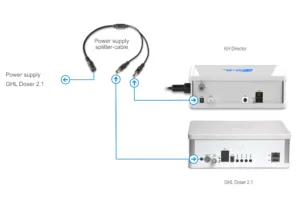
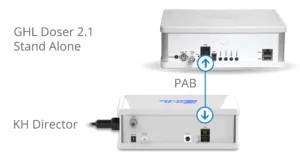
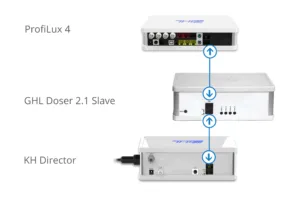
- PAB Connection: Connect the KH Director to your controller or the next available PAB device using a PAB cable.
- PAB Topology: PAB devices must be connected in a chain (daisy chain). The chain starts at the controller and ends at the last device. Do not connect the last device back to the controller, as this creates a ring and will cause communication failure.
- Assign Device:
- Open GHL Connect, myGHL, or GHL Control Center.
- Navigate to System -> PAB-Configuration -> Assign Devices.
- Identify the KH Director and confirm the assignment. Save the changes.
Step 2 — Tubing Installation #
Precision depends on correct tubing placement. Adhering to the recommended lengths for the connections between the GHL Doser and the KH Director helps prevent the formation of air bubbles and ensures consistent flow.
- Installing the Nozzles (Tubing Connectors):
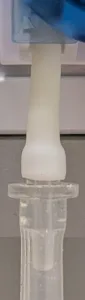
Before connecting the main tubing, you must attach the provided nozzles to the inlet and outlet of each dosing pump assigned to the KH Director (Sample,Reagent, and Waste pumps).- Push the nozzles firmly onto the dosing pump’s internal bridge tubing.
- Important: Ensure the tubing is pulled over the thicker part of the nozzle. It must cover the ridge to prevent the tubing from slipping off or drawing air.
- Recommended Tubing Lengths:
The length requirements differ depending on the section of the tubing:- Doser Outlet to KH Director Inlet: These segments require precise lengths to ensure accuracy.
- Stacked Installation (KH Director on top of Doser):
- Sample Water: 16 cm (6.3″)
- Reagent (Flex-PVC): 17 cm (6.7″)
- Waste Water: 18 cm (7.08″)
- Side-by-Side Installation:
- Sample Water: 26 cm (10.2″)
- Reagent (Flex-PVC): 23.5 cm (9.3″)
- Waste Water: 21 cm (8.3″)
- Stacked Installation (KH Director on top of Doser):
- Suction and Waste Lines: For all other tubing (e.g., from the aquarium to the sample pump, or from the bottle to the reagent pump), keep the segments as short as possible while ensuring they are long enough to reach their sources comfortably.
Note: Keep the reagent tube as short as possible. The total length (from reagent bottle through the pump to the KH Director) must not exceed 70 cm (27.5″). Exceeding this length increases the risk of air bubbles and can affect measurement accuracy.
- Doser Outlet to KH Director Inlet: These segments require precise lengths to ensure accuracy.
- Tubing Layout and Connections:
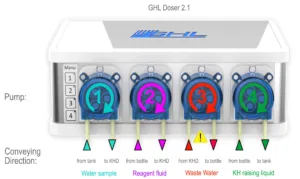
Route the tubing from the sources through the assigned GHL Doser pumps to the KH Director:- Sample Water Path: Aquarium/Sump -> Water sample filter -> Sample pump -> KH Director Water sample
- Reagent Path (using Flex-PVC tubing): Reagent Bottle -> Reagent pump -> KH Director Reagent
- Waste Water Path: KH Director Waste water -> Waste pump -> Drain or waste container
Note: Unlike the other pumps, the Waste pump pulls fluid out of the KH Director. Ensure the suction side (left side) of the pump head is connected to the KH Director. - Vent Line Path: KH Director Vent -> Drain or waste container
This line ensures that no pressure or vacuum builds up inside the measurement cell. In the event of an overfill, excess fluid will exit through this port.
Important: The end of this tube must remain above the water level in the waste container. If submerged, waste water could be siphoned back into the device during the pump-out phase.
Crucial Installation Notes:
- Particle Filter: You must install the provided water sample filter in the suction line of the Sample pump to protect the measurement cell from debris.
- Airtight Connections: Every connection point must be airtight. Ensure the tubing is seated firmly on all nozzles to avoid measurement errors.
- Pump Flow Direction: Pay close attention to the flow direction of each pump:
- Sample & Reagent: The OUTLET (right side) of the dosing pump connects to the KH Director (Pushing fluid into the device).
- Waste: The INLET (left side) of the dosing pump connects to the KH Director (Pulling fluid out of the device).
- Material Choice: Always use the provided Flex-PVC tubing for the Reagent line to prevent air diffusion, which is the most common cause of inaccurate KH readings.
Step 3 — Hardware Preparation (Pumps & Sensor) #
Before the first measurement, the dosing pumps must be configured and calibrated, and the KH Director pH sensor must be prepared and installed.
- Pump Configuration and Calibration:
Each of the three assigned pumps (Sample pump, Reagent pump, and Waste pump) must be set up via the GHL Control Center or GHL Connect.- Speed Setting: Before starting the calibration, you must set the pump speeds:
- Sample & Waste Pumps: Set to Speed 3.
- Reagent Pump: Set to Speed 0. This slow speed is mandatory for the drop-by-drop precision required during titration.
- Level Monitoring:
- For Reagent: Select “Container is emptied”, enter the bottle capacity (e.g., 500ml or 1000ml) and refill the container.
- For Sample Water: Select “Switch off level monitoring.” Level monitoring is not required for the sample water, as the aquarium or sump provides a constant water source.
- For Waste Water:
- If using a waste container: Select “Container is filled” and enter the container capacity. This allows the system to trigger an alarm once the waste container is nearly full.
- If draining directly into a drain: Select “Switch off level monitoring.”
- Calibration: Use a graduated cylinder (min. 40ml) or a precision scale (1g ≈ 1ml). Trigger the calibration process for each pump individually and enter the measured volume to determine the precise flow rate. Ensure the Reagent pump is calibrated specifically at Speed 0 to determine the precise flow rate.
- Detailed Guide: For step-by-step instructions on pump calibration, please refer to the Dosing Pump Calibration Guide.
- Speed Setting: Before starting the calibration, you must set the pump speeds:
- pH Sensor Preparation:
- External Calibration: The sensor must be calibrated before it is installed into the KH Director.
- Connect the BNC cable to the pH port on the back of the KH Director.
- In the software, navigate to Probe/sensor controls -> KH Director (GHL Control Center) or Control -> KH Director (GHL Connect) and click the Calibrate Electrode button.
Note: You may need to enable the KH Director first via the corresponding setting to be able to calibrate the probe. - Follow the wizard using pH 4 and pH 7 buffer solutions. Tip: Gently dry the sensor tip with a lint-free cloth or paper towel when switching between solutions to avoid cross-contamination.
- Alignment: Slide the sensor into the inlet until it is fully seated.
- Installation: After successful calibration, carefully insert the sensor into the measurement cell.
- Securing: Tighten the compression nut firmly by hand to ensure a water-tight seal. Do not use tools, as over-tightening can damage the sensor.
- External Calibration: The sensor must be calibrated before it is installed into the KH Director.
Step 4 — Software Activation & System Flushing #
After the physical installation and calibration, the KH Director must be activated in the software and the tubing lines must be primed to ensure the first measurement is accurate.
- Dosing Pump Numbering (Multi-Doser Setups):
If you are using multiple GHL Dosers, ensure that the pumps of the unit connected to the KH Director are assigned to unique, free pump numbers to avoid conflicts.
Note: If you’re using the pumps of a Doser Standalone you can skip this step, as the pump numbering is fixed to 1-4 in this case.- In GHL Control Center: Navigate to System -> Expand PAB -> Select the Doser from the list -> Click Configuration.
- In GHL Connect App: Navigate to System -> Assign and configure connected PAB-devices -> Tap the gear icon next to the corresponding Doser.
- Activating the KH Director & Tube Volume:
The device must be explicitly enabled and the sample tube volume must be calculated.- In the KH Director settings menu, check the box “KH Director enabled”.
- Sample Tube Volume: Click/tap the calculator icon next to the Sample tube volume field.
- Enter the total length of the tubing from the aquarium/sump to the KH Director.
- The default diameter (4mm) is correct for the provided GHL tubing.
- Important: Check the box “Add inline filter volume” (this automatically adds the 7ml volume of the sample filter) or manually add 7ml to your calculated total.
- Sample Volume: This field determines how much aquarium water is used for each measurement.
- The standard value is usually sufficient for most systems.
- Increasing the sample volume can further improve measurement precision, though it will slightly increase the time required for each test.
- Assign the physical dosing pump numbers to their specific roles: Sample water pump, Reagent pump, and Waste water pump.
- Save Pump Assignments: Before manually priming the lines, you must save the settings currently done. This ensures that the KH Director’s internal valves open correctly when the Reagent pump is triggered.
- Priming the Reagent Lines:
It is important that the reagent line is completely filled, both outside and inside the device, before the first measurement can take place.- External Priming: Use the manual pump button on the GHL Doser to run the reagent pump until the fluid reaches the inlet of the KH Director. Ensure there are no air bubbles visible in the Flex-PVC tubing.
- Internal Priming: Once the reagent has reached the device, run the function “Vent internal reagent tube” in the software. This ensures the internal tubing is also fully primed with reagent.
- Final Preparation: After venting the internal tube, select “Flush measurement cell”. This ensures that any excess fluid introduced during the priming process is rinsed out, leaving the cell ready for an accurate first measurement.
Important Verification:
- Before starting your first measurement, double-check all tubing connections for leaks. Because the KH Director uses titration, a single air bubble in the reagent line or a leak in the sample line will lead to incorrect alkalinity readings.
Configuration & Settings #
After the initial hardware setup and activation, you can now define how the KH Director manages and monitors your aquarium’s alkalinity within the software.
- Measurement Scheduling:
Consistency is the most important factor for accurate tracking. You have two primary ways to automate your measurements:- Measurements per Day: By using this setting together with “Always measure at this time,” the system will distribute the analyses evenly throughout the day.
- Timer Control: Enable the option “Timer starts measurement” and select the desired timer from the dropdown menu. This allows for specific, non-even times or scheduling on certain days.
- Nominal Value & Offset:
Define your target setpoint and fine-tune the device’s accuracy to match your reference tests:- Nominal Value: Enter your desired alkalinity level (e.g., 7.5 °dKH). This value is the absolute baseline that all automated control modes (Dosing, Calcium Reactor, etc.) will aim to maintain.
- Offset (%): If a professional lab analysis shows a constant deviation, you can enter an Offset in percent to align the KH Director readings with your lab results.
- Control Modes (Automated KH Adjustment):
The KH Director can automatically stabilize your alkalinity using different methods based on your equipment:- Control via Dosing Pumps (Add-on / Adaptive Mode): If you use liquid supplements (e.g., Balling), the KH Director can calculate missing doses or adapt your daily dosing schedule. For a detailed guide on this setup, please refer to the Automated Dosing – Add-on & Adaptive Modes article.
- Control via Calcium Reactor / Kalkwasser: If you use a Calcium Reactor or a Kalkwasser setup, the KH Director regulates your KH by dynamically manipulating the nominal pH value (setpoint) of your chosen equipment.
- Sensor: Select the pH sensor that controls your Calcium Reactor (usually inside the reactor) or Kalkwasser addition (usually in the tank/sump).
- Nom. value change: Define how much the pH setpoint should be shifted for every 1 °dKH of deviation. Note: The actual adjustment scales dynamically based on your exact KH deviation.
- Limit for raise KH / Limit for lower KH: Define the absolute maximum allowable pH adjustments. These strict boundaries act as a safety net to prevent extreme pH drops in your reactor or dangerous pH spikes in your aquarium.
- Calculated adjustment: A read-only field showing the currently applied pH offset based on your latest KH measurement.
How the logic works:
- Calcium Reactor: If your KH is too low, the system lowers the reactor’s pH setpoint (injecting more CO2 to dissolve more media). If KH is too high, it raises the pH setpoint.
- Kalkwasser: If your KH is too low, the system raises the assigned pH setpoint (allowing more high-pH Kalkwasser to be dosed). If KH is too high, it lowers the setpoint.
- Alarm Monitoring & Safety:
Protect your system by defining clear boundaries for automated actions:- Alarm Monitoring Enabled: This master toggle activates the safety surveillance for your KH value.
- Thresholds: Set a Lower and Upper Threshold. If the measured KH falls outside this window, an alarm state is triggered.
- Deactivate control during alarm: If enabled, the system will immediately stop automated dosing or pH adjustments during an alarm state to prevent overdosing.
- Recording & Viewing Measurement Data:
To track long-term trends, you must explicitly enable the data logging.- Activation: Ensure the option “Record measurement values” is checked in the KH Director settings.
- Viewing in GHL Control Center: Navigate to Probe/sensor control -> Measurement data to view or export your logs as a CSV file.
- Viewing in GHL Connect: On the KH Director settings page, simply switch to the History Tab to view interactive graphs of your recorded parameters.
Notes #
- Tube Maintenance: Regularly check the sample and reagent tubes for kinks or any visible air pockets. Even a tiny air gap in the reagent line will cause a shift in your titration results. While the sample line should be kept clear of debris, the reagent line must be monitored specifically for airtightness at all connections.
- Handling Reagent: Never shake the reagent bottles. Shaking introduces micro-bubbles that can lead to inaccurate titration volumes. If you have moved or refilled a bottle, let it settle for at least one hour before the next scheduled measurement.
- Device Leveling: For the titration process to work with maximum precision, the KH Director must be placed on a completely flat, horizontal surface. The device should not exceed a maximum tilt of ±3° in any direction.
Common Issues #
Cause
Most measurement problems trace back to one of three physical installation errors rather than a software or hardware fault:
- Wrong tubing material: Standard silicone tubing used for the Reagent line instead of the provided Flex-PVC. Silicone allows air diffusion, which shifts titration results over time.
- Vent tube kinked or submerged: A blocked or submerged vent tube prevents proper pressure equalization and can allow waste water to siphon back into the measurement cell.
- Reagent and Reference solution mixed up: The KH Reagent is required for every titration; the KH Reference solution is only used to verify accuracy (see “Deviation compared to manual drip-test kits” below) and will cause the titration to fail if dosed by mistake.
Solution
- Check tubing material: Confirm that Flex-PVC tubing is used along the entire Reagent path (bottle → pump → KH Director).
- Check the vent tube: Ensure it is unobstructed and its open end remains above the waterline of the waste container.
- Check bottle labels: Verify labels before connecting or refilling the Reagent pump.
Cause
This is most commonly caused by micro-air bubbles trapped in the reagent line or a pH sensor that requires re-calibration or replacement.
Solution
Ensure all reagent tube connections are airtight. Re-prime the reagent line using the “Vent internal reagent tube” function until no bubbles are visible in the line. If the sensor has been in use for some time, perform a fresh 2-point calibration (pH 4 and 7).
Cause
The system was unable to reach the titration endpoint within the allocated time or reagent volume. This can happen if the reagent line is not fully primed, if the Reagent pump is incorrectly calibrated, or if KH Reference solution was accidentally used instead of the actual KH Reagent. Additionally, if the measurement cell was not completely emptied after the previous test or if too much sample water is being drawn in, the titration will fail.
Solution
Verify that you are using the correct Reagent (not Reference) fluid and that the line is fully primed. Re-calibrate the Reagent pump at Speed 0. To resolve water volume issues, check the calibration of your Sample and Waste pumps and run the “Empty measurement cell completely” function to ensure a clean start.
Cause
Manual tests rely on subjective color interpretation, which can vary due to lighting or the timing of the color shift. Additionally, reagent aging or batch tolerances can lead to different readings.
Solution
Trust the trend of the KH Director over a single manual test. If a professional laboratory analysis confirms a constant deviation, use the Offset option to align the values.
For a comprehensive guide on resolving specific error codes or advanced maintenance, please refer to our Main Troubleshooting Guide for KH Director.