


Aquarium and building on one panel — the water values come from the ProfiLux through the GHL API
Your ProfiLux already runs your aquarium, your Mitras lights it. The GHL API lets the rest of your automation system in on it — read what the device measures, change settings and ask it to do something.
What you can do with the GHL API
- Your aquarium in the same system as everything else. Temperature, pH, redox and conductivity, on the same screen that already shows the rest of the building’s technology.
- Carbonate hardness and ion concentrations too. KH from the KH Director, and five measured values from the ION Director including calcium and magnesium — the same values the ProfiLux controls with.
- Power and equipment at a glance. Which outlets are switched on, and how much current each one draws.
- Under the names you gave them. Sensors, outlets and dosing pumps report the names entered in GHL Control Center or GHL Connect, so the panel shows “Display tank” and “Heater” instead of index numbers.
- History, not just the current value. The ProfiLux records its measurements itself, into non-volatile memory. The API hands out those stored records — timestamp, values and status — so the history is available without polling around the clock.
- Warnings and alarms before something goes wrong. Level and flow sensor readings, sensor alarms and the fill level of dosing containers.
- Feed pause as part of your automation. Start and stop it from a wall switch, a dashboard or a voice command.
- Water change and maintenance the same way. Both modes can be started and stopped from your system.
- Light scenes on demand. One of eight stored scenes, called up with a fade time of your choosing — subdued light for the evening, or full brightness for a closer look. The scene holds until it is switched off again.
- A thunderstorm on request. Started by the building automation.
- Setpoints from your own system. Change the target temperature, the KH or an ION Director value from your dashboard.
Simple enough to try in five minutes
Local. No cloud required.
Everything runs on your own network, over a plain TCP port or a WebSocket. No cloud service is involved, no data leaves your network, and nothing stops working because a server somewhere is down.
Your controller stays in charge
The GHL API reads values and requests actions. It does not switch outputs and it does not replace any control loop.
Temperature control is the clearest example. If the water gets too cold, the ProfiLux switches the heater — not the automation system you connected to it. That is why the API offers no direct control over outputs: a network outage or a crashed server must never leave a tank unheated.
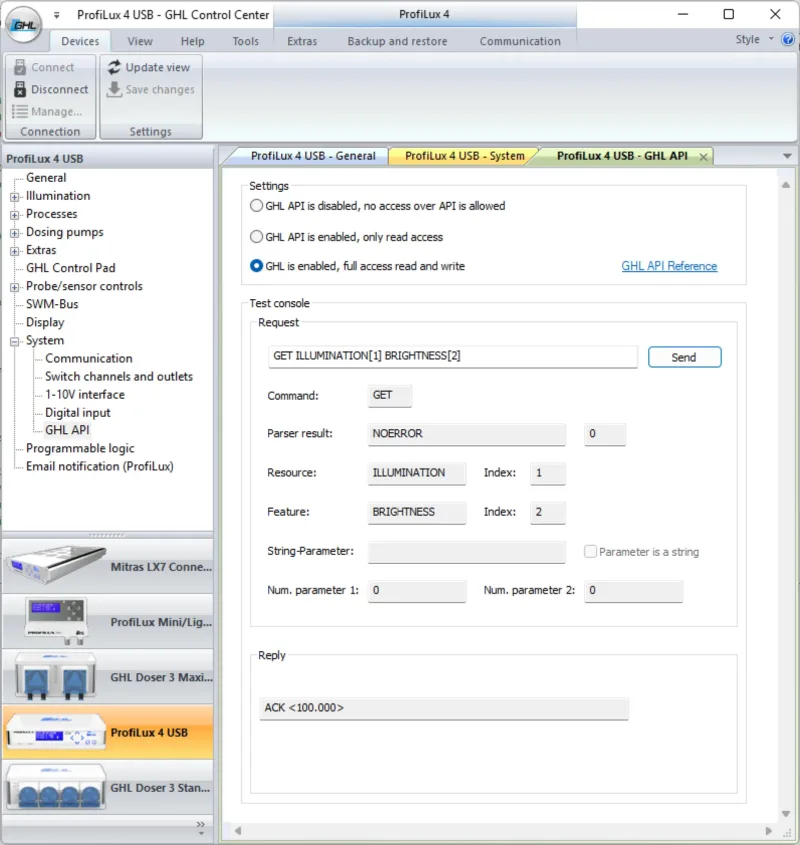
Test console in GHL Control Center – also available in the GHL Connect App
No SDK. No library. No account, no registration, no developer portal.
Commands are plain lines of text, and there are exactly two of them: GET asks for a value, SET writes one or starts something. Everything else is simply the name of what you want to reach.
Here is a complete exchange. The first line asks the controller for the current temperature of the first sensor. The second line is its answer: 24.412 °C.
GET SENSOR[0] ACTVALUE
ACK <24.412>
That is all there is to it. If you can open a terminal, you can use this API — and you can try every command in GHL Control Center or GHL Connect before you write a single line of code.
The API is switched off by default and you enable it on the device yourself — either for reading only, or with full access. Nothing on your network can reach your aquarium unless you have decided so.
Ready-made examples for Home Assistant, Python and WebSocket clients are included in the reference.
Which devices
ProfiLux 4, ProfiLux 4.1 and their variants, and Mitras LX7, Mitras LX8 and Mitras LX7 IL luminaires.
The ProfiLux exposes sensors, setpoints, switch channels, dosing pumps, flow and level sensors, KH Director, ION Director and the stored measurement history. The Mitras exposes its illumination channels and daily curves.
For system integrators
The API is a documented text protocol over a plain TCP port or a WebSocket. No GHL-specific software, driver or library is needed on your side — any system that can open a socket can read every measured value, every device status and the stored history, write setpoints and names, and trigger special functions such as feed pause, water change or maintenance.
The device can also be set to read only. The building management system then sees everything and can change nothing.
The GHL API is provided free of charge, as is and without support. You will see the full terms of use before the reference opens. GHL offers paid services for integrating the API into your system.
Please note: Some of the mentioned features require P4 firmware V7.52, LX7 firmware V1.22, GCC V1162 or the next version of the app. All updates will be released in the next few days.
Terms of use for the GHL API
By ticking the box below I confirm that I have read and accept the following.
The GHL API is provided free of charge and as is. GHL gives no warranty of any kind, whether express or implied, that it is fit for a particular purpose, that it is free of errors, that it is available without interruption, or that it meets my expectations.
Use of the API is voluntary and entirely at my own risk. I am responsible for the software I connect to it, for the commands I send, and for the effects those commands have on my aquarium and on the equipment connected to it.
I am aware that the API is disabled by default and that I enable it by my own decision. I am responsible for the security of the network my device is connected to.
The API must not be used as the sole means of monitoring or controlling life-supporting functions. My GHL controller remains responsible for controlling the aquarium.
To the extent permitted by law, GHL accepts no liability for any direct or indirect damage, consequential damage or loss arising from the use of the API — in particular damage to livestock, plants, equipment or property, loss of data, loss of profit or other financial loss. This applies regardless of the legal basis of the claim.
GHL may change, restrict or discontinue the API at any time and without notice. Commands may behave differently in future firmware versions.
No free support is available for the use of the API. GHL neither reviews, endorses nor supports software written by third parties.
Last updated on: August 27, 2026