

Summary #
This article guides you through the complete hardware and software integration of the ION Director. It covers the physical connection via the ProfiLux Aquatic Bus (PAB), precise tubing installation, and the essential sensor preparation process required for automated multi-ion measurements.
Looking for the full technical manual? Download the ION Director Manual.
Applies to #
- ION Director
- Compatible controller:
- ProfiLux 4 Series (incl. Industrial Line / IL) (Min. firmware 7.24)
- ProfiLux 3 Series (Min. firmware 6.44)
- GHL Doser 2 / Maxi / 2.2 Maxi Series Standalone (incl. Industrial Line / IL) (Min. firmware 1.37)
- GHL Doser 3 / 3 Maxi Series Standalone (incl. Industrial Line / IL)
- Software:
- GHL Connect (App, Webinterface, myGHL)
- GHL Control Center
Before you start #
Ensure the following requirements are met before beginning the installation:
- Controller Setup: Your ProfiLux or Doser Standalone must be fully configured and accessible via GHL Connect, myGHL or GHL Control Center.
- Dosing unit: A GHL Doser 2 or Doser 3 (not a Doser Maxi) with at least 3 available dosing pumps is required for operation (included in ION Director sets).
- Included Components: MUI-Sensor, Y-power splitter cable, PAB cable(s), reference fluids A & B, water sample filter, pre-drilled caps and Flex PVC tubing.
- PAB connection: One PAB cable is required to connect the ION Director to the controller; an additional PAB cable is required for the Doser.
- Tools for Calibration: A graduated cylinder (min. 40ml) OR a container and a precision scale to determine the flow rate.
- Measuring Tool: A ruler or tape measure to determine the length of your sample tube.
Controller not yet configured?
If your controller is not yet set up, complete its initial configuration first. See the following articles:
Installation & Initial Setup #
Follow these steps for the first-time installation of your ION Director.
Step 1 — Power and PAB Communication #
The ION Director communicates via the ProfiLux Aquatic Bus (PAB) and shares its power source with the dosing unit.
- Electrical Connection: Use the GHL Y-power splitter cable to connect both the Doser and the ION Director to the Doser’s 24V power supply.
- Note: The ION Director must be powered through the Doser’s 24V line. Do not connect this 24V power source to a ProfiLux controller.
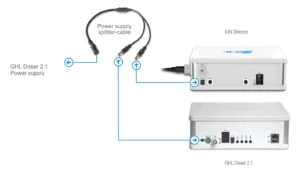
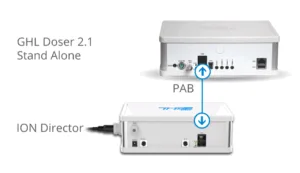
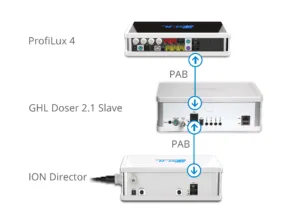
- PAB Connection: Connect the ION Director to your controller or the next available PAB device using a PAB cable.
- PAB Topology: PAB devices must be connected in a chain (daisy chain). The chain starts at the controller and ends at the last device. Do not connect the last device back to the controller, as this creates a ring and will cause communication failure.
- Assign Device:
- In GHL Control Center: Go to the System page and click Assign devices.
- In GHL Connect: Go to the System page, select Assign and configure connected PAB-devices, then tap Assign devices.
- Check the box next to the newly found ION Director and save the assignment.
Step 2 — Tubing Installation #
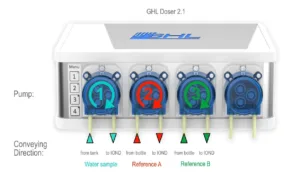
Precision depends on correct tubing placement. Adhering to the recommended lengths for the connections between the GHL Doser and the ION Director helps prevent the formation of air bubbles and ensures consistent flow.
- Installing the Nozzles (Tubing Connectors):
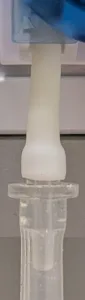
Before connecting the main tubing, you must attach the provided nozzles to the inlet and outlet of each dosing pump assigned to the ION Director (Sample, Reference A, and Reference B pumps).- Push the nozzles firmly onto the dosing pump’s internal bridge tubing.
- Important: Ensure the tubing is pulled over the thicker part of the nozzle. It must cover the ridge to prevent the tubing from slipping off or drawing air.
- Recommended Tubing Lengths:
The length requirements differ depending on the section of the tubing:- Doser Outlet to ION Director Inlet: These segments require precise lengths to ensure accuracy.
- Stacked Installation (ION Director on top of Doser):
- Sample Water: 16 cm (6.3″)
- Reference A: 17 cm (6.7″)
- Reference B: 18 cm (7.08″)
- Side-by-Side Installation:
- Sample Water: 26 cm (10.2″)
- Reference A: 23.5 cm (9.3″)
- Reference B: 21 cm (8.3″)
- Stacked Installation (ION Director on top of Doser):
- Suction, Waste, and Vent Lines: For all other tubing (e.g., from the aquarium to the sample pump, or from bottles to reference pumps), keep the segments as short as possible while ensuring they are long enough to reach their sources comfortably.
- Doser Outlet to ION Director Inlet: These segments require precise lengths to ensure accuracy.
- Tubing Layout and Connections:
Route the tubing from the water sources through the assigned GHL Doser pumps to the ION Director:-
- Sample Water Path: Aquarium/Sump -> Water sample filter -> Sample pump -> ION Director Water sample
- Reference A Path: Bottle Reference A (using the pre-drilled cap) -> Reference A pump -> ION Director Ref. A
- Reference B Path: Bottle Reference B (using the pre-drilled cap) -> Reference B pump -> ION Director Ref. B
- Waste Water Path: ION Director Waste water -> Drain or waste container
- Vent Line Path: ION Director Vent -> Back to the aquarium/sump or to the drain. This line is used to purge old sample water from the tubing before a measurement. Ideally, the end of the tube should remain above the water line to prevent any potential backflow
-
Crucial Installation Notes:
- Particle Filter: You must install the provided water sample filter in the suction line of the Sample pump to protect the MUI sensor from debris.
- Pump Flow Direction: Ensure the dosing pumps are connected in the correct orientation; the OUTLET (right side) of the Sample, Reference A, and Reference B pumps must be connected to the corresponding inlet ports on the ION Director to push the fluids into the measurement cell.
- Airtight Connections: Every connection point must be airtight. Ensure the tubing is seated firmly on all nozzles to avoid measurement errors.
Step 3 — Hardware Preparation (Pumps & Sensor) #
Before the first measurement, the dosing pumps must be configured and calibrated, and the MUI sensor must be installed.
- Pump Configuration and Calibration:
Each of the three assigned pumps (Sample pump, Reference A pump, and Reference B pump) must be set up via the GHL Control Center or GHL Connect.- Speed Setting: You must set all three pumps to Speed 3. This must be done before starting the calibration.
- Level Monitoring:
- For Reference A and Reference B: Select “Container is emptied”, enter the bottle capacity (e.g., 500ml or 1000ml) and refill the container.
- For Sample Water: Select “Switch off level monitoring.” Level monitoring is not required for the sample water, as the aquarium or sump provides a constant water source.
- Calibration: Use a graduated cylinder (min. 40ml) or a precision scale (1g ≈ 1ml). Trigger the calibration process for each pump individually and enter the measured volume to determine the precise flow rate.
- Detailed Guide: For step-by-step instructions on pump calibration, please refer to the Dosing Pump Calibration Guide.
- MUI Sensor Installation (Critical Step):
The MUI sensor is the heart of the ION Director and requires extremely careful handling.- Remove Protection: The sensor is delivered in a small plastic protective sleeve held by a rubber band. Remove the rubber band and slide off the sleeve before installation.
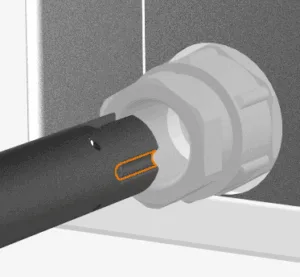
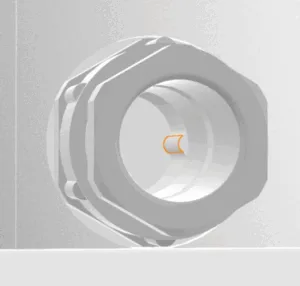
- Correct Alignment: The sensor has specific grooves on its side. These correspond exactly to the guides located inside the MUI sensor inlet of the ION Director.
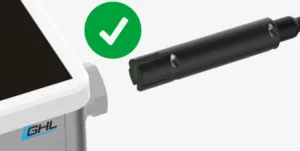
- Align the sensor correctly before attempting to slide it in. Do not force it.
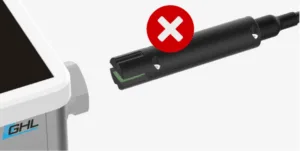
- Insertion: Carefully slide the sensor into the inlet until it is fully seated.
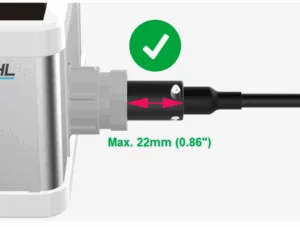
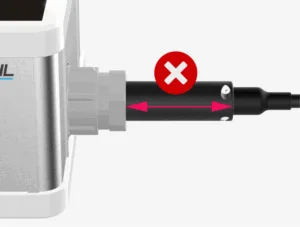
- Important: A correctly inserted sensor should only protrude a maximum of 22 mm (0.86″) from the ION Director housing. If it is sticking out further, do not tighten the pressing screw; realign and reinsert it.
- Securing: Tighten the pressing screw firmly by hand. It must be tight enough to compress the internal seal and prevent leaks, but do not use tools as they could damage the sensor.
- Sensor Cable Connection:
Plug the sensor cable into the designated port on the back of the device.
Step 4 — Software Activation & Sensor Conditioning #
After the physical installation, the ION Director and the MUI sensor must be activated in the software before the first measurement can take place.
- Dosing Pump Numbering (Multi-Doser Setups):
If you are using multiple GHL Dosers, ensure that the pumps of the new unit are assigned to unique, free pump numbers to avoid conflicts.
Note: If you’re using the pumps of a Doser Standalone you can skip this step, as the pump numbering is fixed to 1-4 in this case.- In GHL Control Center: Navigate to System -> Expand PAB -> Select the Doser from the list -> Click Configuration.
- In GHL Connect App: Navigate to System -> Assign and configure connected PAB-devices -> Tap the gear icon next to the corresponding Doser.
- MUI Sensor Activation:
Each MUI sensor is unique. You must register its serial number to activate it.- Locate the serial number on the sensor’s cable.
- In the ION Director sensor settings, click or tap the info-icon (i) next to the Serial number or Sensor field to enter the number and confirm the activation.
- Activating the ION Director & Tube Volume:
The device must be explicitly enabled and the sample tube volume must be calculated.- In the ION Director settings menu, check the box “ION Director enabled”.
- Sample Tube Volume: Click/tap the calculator icon next to the Sample tube volume field.
- Enter the total length of the tubing from the aquarium/sump to the ION Director.
- The default diameter (4mm) is correct for the provided GHL tubing.
- Important: Check the box “Add inline filter volume” (this automatically adds the 7ml volume of the sample filter) or manually add 7ml to your calculated total.
- Assign the physical dosing pump numbers to their specific roles: Sample water pump, Reference A pump, and Reference B pump.
- Priming and Sensor Conditioning:
The sensor must be prepared for contact with aquarium water through a conditioning process.- Priming: Use the “Prime measurement cell” function to ensure all lines are completely filled and free of air bubbles.
- Conditioning: Select “Prepare measurement cell”. The ION Director will fill the measurement chamber with Reference A fluid.
- Duration: The sensor must be prepared in the fluid for at least 12 hours before the very first measurement.
Important Verification:
- Before starting your first measurement after the 12-hour period, double-check all tubing connections for leaks. A single air bubble can lead to an “MUI Sensor Error” or incorrect readings.
Configuration & Settings #
After the initial hardware setup and activation, you can now define how the ION Director manages and monitors your aquarium’s chemistry within the software.
- Measurement Scheduling:
Consistency is the most important factor for accurate tracking. You have two primary ways to automate your measurements:- Measurements per Day: By using this setting together with “Always measure at this time,” the system will distribute the analyses evenly throughout the day.
- Timer Control: Enable the option “Timer starts measurement” and select the desired timer from the dropdown menu. This allows for specific, non-even times or scheduling on certain days.
Note: It is recommended to perform at least one measurement per day to keep the sensor responsive. - Wait Period: After any pump activity in the measurement cell (Prepare, Prime, or a previous measurement), you must allow at least one hour of rest before starting the next measurement to ensure accuracy.
- Nominal Values, Offset & Double Check:
Fine-tune how the system handles the recorded data:- Nominal Value: Define your desired setpoint for each ion (e.g., Ca: 420 mg/l). This serves as the baseline for automated dosing control.
- Offset: If a professional lab analysis shows a constant deviation, you can enter an Offset to align the IOND readings with your lab results.
- Double Check: When active, the system automatically triggers a second measurement if a result deviates significantly from the previous one, preventing “outlier” data from affecting your tank.
- Alarm Monitoring & Safety:
Protect your system by defining clear boundaries for automated actions:- Alarm Monitoring Enabled: This master toggle activates the safety surveillance for your parameters.
- Thresholds: Set a Lower and Upper Threshold for each ion. If a value falls outside this window, an alarm state is triggered.
- Shut off control when alarm: If enabled, the system will immediately stop automated dosing adjustments during an alarm. If disabled, the system continues to regulate but will still display an alarm status.
- Recording & Viewing Measurement Data:
To track long-term trends, you must explicitly enable the data logging.- Activation: Ensure the option “Record measurement values” is checked in the ION Director settings.
- Viewing in GHL Control Center: Navigate to Probe/sensor control -> Measurement data to view or export your logs as a CSV file.
- Viewing in GHL Connect: On the ION Director settings page, simply switch to the History Tab to view interactive graphs of your recorded parameters.
- Monitoring Sensor Performance:
The Sensor Performance Bar provides real-time feedback on the MUI sensor’s health:- Green: Optimal performance.
- Yellow/Red: Indicates decreasing reliability. Common causes include air bubbles in the supply lines or debris in the measurement cell. If the performance remains low after these causes have been ruled out, the MUI sensor may have reached the end of its service life or be defective and must be replaced.
Notes #
To maintain the long-term precision of your ION Director, keep these operational rules in mind:
- Handling Reference Fluids: Never shake the bottles. Shaking introduces micro-bubbles that can lead to inaccurate measurements. If you move a bottle, let it settle for at least an hour before the next measurement.
- Stability: Ensure the unit is placed on a stable, vibration-free surface. Sudden movements during a measurement cycle can affect the sensitive MUI sensor.
- Tube Maintenance: Regularly check the sample and reference tubes for kinks or any visible debris. Even a tiny air pocket in the reference lines will cause a shift in your results.
Common Issues #
Cause
Low or fluctuating sensor performance during initial setup is most often caused by air in the supply lines — either from loose connections or from tubing material that isn’t fully airtight:
- Air bubbles: Trapped micro-bubbles in the reference or sample lines, usually from loose connections.
- Wrong tubing material: Standard silicone tubing used instead of the provided Flex-PVC. Silicone allows air to diffuse through the tube wall over time, causing recurring micro-bubbles even with tight connections.
- Worn or defective sensor: The MUI sensor has a limited chemical lifespan. If air-related causes have been ruled out and the performance remains low, the sensor may have reached the end of its service life or be defective.
Solution
- Check all connections for airtightness and use Prime measurement cell until the lines are completely free of visible bubbles.
- Confirm that Flex-PVC tubing is used along the entire Sample, Reference A, and Reference B paths — replace any silicone sections.
- If the sensor performance remains low after these checks, replace the MUI sensor. See ION Director – Maintenance & Sensor Care.
Cause
Insufficient conditioning or ignoring the wait periods between pump activities.
Solution
Ensure the initial 12-hour conditioning period was completed. Ensure a one hour wait time after each ION Director action or a restart of the ION Director.
For a comprehensive guide on resolving specific error codes or advanced maintenance, please refer to our Main Troubleshooting Guide for ION Director.