

Summary #
Regular maintenance is crucial for the longevity and accuracy of your GHL Doser. This guide covers the physical upkeep of your devices, including how to maintain pump heads, replace internal tubing, and swap out internal pump motors or complete pump housings. Additionally, it details the advanced configuration steps to switch a Standalone (SA) Doser into an Extension (EXT) mode.
Applies to #
- GHL Doser 2 / Maxi / 2.2 Maxi Series (incl. Industrial Line / IL)
- GHL Doser 3 / 3 Maxi Series (incl. Industrial Line / IL)
Prerequisites #
- Tools for maintenance::
- Torx T8 screwdriver (for Doser 2 and Doser 3 pump caps)
- Torx T9 screwdriver (or T8, for Doser 3 motor/pump housing)
- Torx T15 screwdriver (for Doser Maxi pump housing)
- 2.5mm Hex (Sechskant) screwdriver (for housing screws and Doser 2 motor)
- 2.0mm Hex (Sechskant) screwdriver (for Doser Maxi motor screws)
- GHL specialized lubricant (for Doser 3 and Maxi models only)
- A soft surface (blanket or cloth) to prevent scratches when flipping the device.
- Calibration Tool: A precise measuring cylinder (e.g., 50ml or 100ml) or a precision scale (measuring in grams, as 1ml of water equals approximately 1g).
Required Replacement Parts & Kits #
To ensure maximum precision and prevent leaks, we recommend using only original GHL replacement parts. You can find the correct components for your specific model in the GHL Store:
Pump Head & Tube Maintenance #
To ensure reliable operation, the pump head and its components (tube, rollers, cap, etc.) should be cleaned and inspected for damage every 2-3 months. If you notice wear or functional issues during inspection, the respective wear parts should be replaced immediately.
Note: Replacing the pump head or internal tube requires a new calibration of the pump.
Doser 2 Series (Standard) #
- Disconnect the Doser from power and remove all cables and tubes.
- Use a Torx T8 screwdriver to remove the 2 screws holding the blue pump cap.
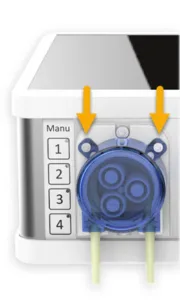
- Remove the cap to access the 3 rollers, turntable, and tube. Clean these components with a wet cloth.
- CRITICAL: Do NOT use any lubricant or grease on Doser 2 pump heads. This will interfere with the pump’s functionality.
- Inspect for damage. If needed, replace the damaged parts. Reattach the cap with the 2 T8 screws.
Doser 3 Series (Standard) #
- Disconnect the Doser from power and remove all cables and tubes.
- Use a Torx T8 screwdriver to remove the 4 screws holding the blue pump cap.
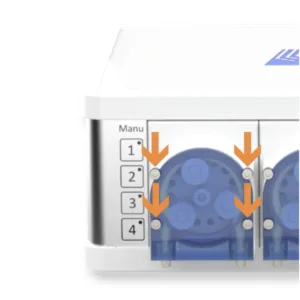
- Clean and inspect the internal assembly. These heads are pre-lubricated from the factory.
- Lubrication: If you remove the existing grease, you must re-apply a suitable GHL lubricant to the gears and rollers.
- Replace components if damaged and secure the cap with the 4 T8 screws.
Doser Maxi (2.2 & 3) #
- Disconnect the Doser from power and remove all cables and tubes.
- Apply downward pressure to the blue cover and pull it downwards to slide it out of the housing.
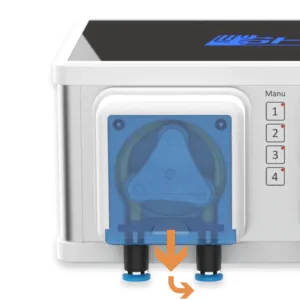
- Clean and inspect the internal assembly. These heads are pre-lubricated from the factory.
- Lubrication: If you remove the existing grease, you must re-apply a suitable GHL lubricant to the internal parts (tube, rollers, etc.).
- Re-insert the blue cover until it clicks into place.
Pump Motor & Pump Head Replacement #
If a motor fails, becomes overly noisy due to extensive wear, or the complete pump head itself is damaged, the internal pump motor or the complete pump housing unit can be replaced. Disconnect all cables (Power, USB, PAB, etc.) and tubes before opening the device.
Note: Replacing the motor or pump head requires a new calibration of the pump.
Step 1: Opening the Device (All Models) #
- Place the Doser upside down on a soft surface.
- Use a 2.5mm Hex screwdriver to remove the 4 corner screws on the bottom plate.
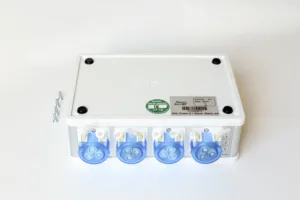
- Flip the device back over and lift the top cover carefully. Warning: The LED in the lid is connected to the board. Gently move the lid aside without unplugging or straining the LED cable.
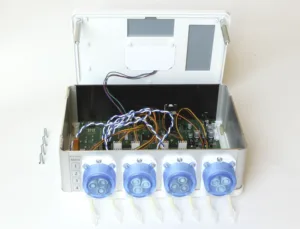
Step 2: Removing the Motor or Complete Housing #
Doser 2 Series
- Use a 2.5mm Hex screwdriver to remove the 2 screws on the outside of the pump head.
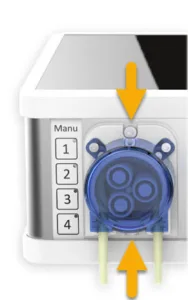
- Note: Hold the 2 nuts (above and below the motor) inside the device so they don’t get lost when they fall off. You will need them for reassembly.
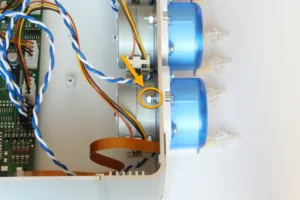
- You may need to slightly lift the front metal plate to reach the lower screw.
Doser 3 Series
- Remove the 2 Torx T9 (or T8) screws from the inside at the motor.
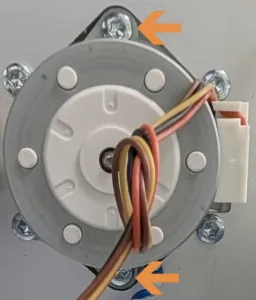
- Complete Housing: Additionally remove the 4 T9 screws from the inside that secure the housing to the front plate.
These screws should NOT be removed if you are only replacing the motor.
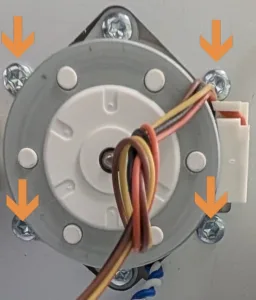
- You may need to slightly lift the front metal plate to reach the lower screws.
Doser Maxi (2.2 & 3)
- Open the pump head and remove all internal components (tube and roller assembly) as described in the previous section Pump Head & Tube Maintenance
- Unscrew the now visible 4 2.0mm Hex screws to release the motor.
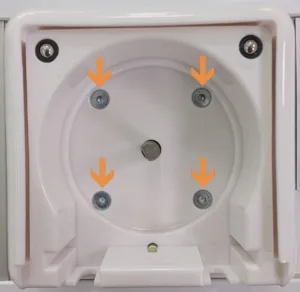
- Complete Housing: Additionally remove the 4 Torx T15 screws from the inside of the device.
These screws should NOT be removed if you are only replacing the motor.
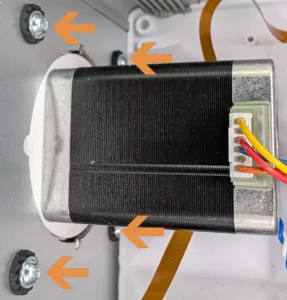
Step 3: Finalizing #
- Cable Management:
- If replacing a motor: Carefully unplug the motor cable from the mainboard and swap the unit. Connect the new motor cable to the exact same port.
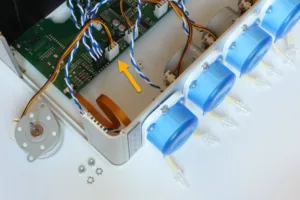
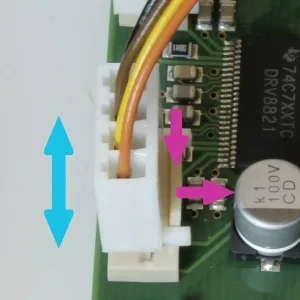
- If replacing ONLY the pump housing: No cables need to be disconnected. Ensure the motor cable remains securely plugged in while swapping the housing parts.
- If replacing a motor: Carefully unplug the motor cable from the mainboard and swap the unit. Connect the new motor cable to the exact same port.
- Reassembly: Reassemble the device in reverse order. Before closing the lid, verify that all internal cables (including the LED lid cable) are tucked away safely and are not being pinched by the housing.
Pump Calibration #
To maintain the high precision of the GHL Doser, calibration should be performed regularly—ideally once a month or immediately if you notice discrepancies in dosing volumes.
- Mandatory Requirement: Calibration must always be performed after any hardware maintenance (tube, head, or motor replacement).
Step-by-Step Calibration Process #
- Prepare the equipment: Place a precise measuring cylinder (e.g., 50ml or 100ml) or a precision scale under the tube outlet of the pump you wish to calibrate.
- Prime the lines: Ensure the dosing tube is completely filled with liquid and contains no air bubbles. Use the Manual dosing button on the device or in the software to run the pump until fluid flows consistently.
- Start Calibration: In the software (GHL Connect or GHL Control Center), navigate to the settings of the respective pump and click the Calibrate button. The pump will now run for exactly one minute.
- Measure the output: Once the pump stops, check the volume in your measuring cylinder or weigh the liquid on your scale (1g of water ≈ 1ml).
- Save the value: Enter the measured amount in milliliters (ml) into the Max. flow field in the software and save the settings.
For tips on maximizing dosing accuracy during calibration (tubing length, pump speed), see the GHL Doser – Setup, Calibration & Schedules article.
Advanced Configuration – SA/EXT Switch #
If you add a ProfiLux controller to your system and want it to manage all dosing tasks, you must switch the Doser from SA to EXT mode. With current firmware, the Doser remains accessible over your network after the switch.
Step 1: Switching the Operating Mode #
- Connect to your Standalone Doser using GHL Control Center or the GHL Connect app.
- Navigate to the General settings page.
- Locate the Operating mode section.
- Switch the mode from Standalone to Extension (EXT).
- Save the changes.
Step 2: PAB Assignment on the Master Controller #
- Connect the EXT Doser to your ProfiLux using a PAB cable.
- Connect to your ProfiLux via GHL Connect or GHL Control Center.
- Navigate to the System page
- GHL Connect only: Select Assign and configure connected PAB devices.
- Click Assign devices and select the Doser from the list.
- Save the assignment. The ProfiLux now controls these pump heads.
Step 3: Configuring Pump Numbering #
Once assigned, you must define the device’s pump range to avoid conflicts with existing pumps (e.g., both devices trying to act as Pump 1).
- Access the Configuration menu:
- In GHL Control Center: Go to the System page, select/highlight the Doser in the device tree, and click Configuration.
- In GHL Connect: Go to the System page, select Assign and configure connected PAB devices, and click the gear icon next to the respective device.
- Adjust “Start numbering”: Enter the number at which this device’s pumps should begin and save the change.Example: If your other Dosers already occupy pumps 1–8, set the “Start numbering” for the new Extension unit to 9.
Notes #
- Mandatory Calibration: Any physical intervention, such as replacing a tube, a pump head, or a motor, affects the flow rate. To maintain accuracy, a new calibration is strictly mandatory after any hardware maintenance.
- Lubrication Warning: Never use any lubricant on Doser 2 pump heads, as this will lead to malfunctions. For Doser 3 and Maxi models, use original GHL lubricant to ensure smooth operation and longevity.
- Visual Inspection Frequency: Even if the system seems to run perfectly, perform a visual inspection every 2–3 months. Checking for salt creep or micro-tears in the tubing early can prevent expensive damage to the internal electronics.
- Original Spare Parts: Only use original GHL tubes and components. Third-party tubes often have different wall thicknesses or elasticity, which can lead to inaccurate dosing or even damages to the pump head or motor.
Common Issues #
Cause
Over time, salt creep, dust, or dried-out factory lubricant (Doser 3/Maxi) can create friction that prevents the motor from turning smoothly or causes it to “hang.”
Solution
Open the pump head and clean all internal parts (rollers, turntable, and housing) with a lint-free cloth. For Doser 3 and Maxi models, re-apply GHL lubricant. For Doser 2, ensure the head remains completely clean and dry— never use lubricant here as it will impair functionality.
Cause
If the hardware has been replaced, the physical flow rate will no longer match the stored software values.
Solution
You must perform a new calibration as described in section Pump Calibration to ensure the software knows the exact flow rate of the serviced pump.
Cause
When a Doser is switched from Standalone (SA) to Extension (EXT) mode, it stops following its own internal logic and schedules because it is now waiting for direct commands from a Master controller.
Solution
Verify the “Device operating mode” in the General settings of GHL Control Center or GHL Connect. If the mode is set to Extension (EXT), you must program all dosing schedules on the Master device (ProfiLux or Master Doser). The EXT unit will no longer react to any schedules programmed directly on its own interface.