

Summary #
This guide explains how to connect and configure a variable-speed pump using the ProfiLux 1-10V interface. Once the pump is assigned to a channel, flow schedules and wave patterns are configured via Pump Groups.
Applies to #
- ProfiLux 4 Series (incl. Industrial Line / IL)
- ProfiLux 3 Series
- Software:
- GHL Connect (App, Webinterface, myGHL)
- GHL Control Center
Before you start #
- Control cable: A compatible control cable is required to connect your pump to the ProfiLux L-port. In most cases this is available from the pump manufacturer. If only a bare-wire or incompatible cable is available, use the S-Port & L-Port Breakout Box to connect it — refer to the Breakout Box manual for wiring details.
- Voltage range: Check your pump’s documentation for the correct control voltage range. Most pumps use 1–10V. Tunze stream pumps typically use a reduced range (e.g. 3–8V) — check the pump manual for the exact values.
- L-port capacity: Each L-port controls two independent 1-10V channels (e.g. L1/L2, L3/L4). To use both channels on a single port, a YL2 Splitter Cable is required. For Tunze pumps, the ProfiLux-Tunze Adapter Cables (ProfiLuxTunze1 / ProfiLuxTunze2) are also needed — see Step 1 for details.
Installation & Setup #
Step 1 — Connect the pump #
- Connect one end of the control cable to your pump’s control port or driver or connect it to the S-Port & L-Port Breakout Box.
- Connect the other end to an available yellow L-port on the ProfiLux, expansion card, or Expansion Box.
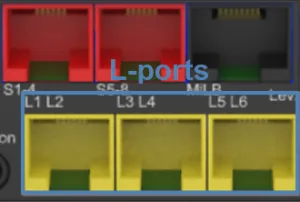
Yellow L-ports on the ProfiLux 4 — port count and layout vary by model and expansion.
- If using a YL2 Splitter Cable: plug the splitter into the L-port first, then connect the individual pump cables to the splitter outputs.
Tunze pumps — Adapter cable note: Tunze pumps require the GHL Tunze adapter cables (T1 or T2). These cables are not interchangeable — T1 controls odd-numbered channels (L1, L3, L5, …), T2 controls even-numbered channels (L2, L4, L6, …). For a single Tunze pump, only a T1 cable is needed — without a splitter, the port always uses the odd-numbered channel. When connecting two Tunze pumps via a YL2 splitter to a single L-port, use one T1 and one T2 cable.
Step 2 — Assign the interface in software #
Navigate to the 1-10V interface settings:
- In GHL Control Center: Go to System → 1-10V interface and select the channel corresponding to your L-port.
- In GHL Connect: Select 1-10V interfaces from the main menu and tap the relevant channel.
Configure the following settings:
- Function: Set to Pump and assign a pump channel number. This number is used to identify the pump in Pump Groups.
- Output signal — U min. / U max.: Set according to your pump’s specifications. Most pumps: 1–10V. Tunze stream pumps typically use a reduced range (e.g. 3–8V) — check the pump manual for the exact values.
Save the settings. Repeat for each additional pump channel.
Next steps #
Your pump is now assigned to a channel and ready for scheduling. Continue with Pump Groups to configure flow programs, wave patterns, and event reactions:
Notes #
- Channel numbering across ports: Channel numbers are sequential across all L-ports, including those on expansion cards and the Expansion Box. For example, if the ProfiLux has ports L1/L2 through L5/L6, an expansion card adds L7/L8 and beyond. Ensure channel numbers do not conflict with other assigned pumps.
- Return pumps: Return pumps with a 1-10V interface are set up the same way. For an overview of all return pump control options, see: Return Pump Control – Overview & Use Cases
Common Issues #
Cause
The voltage range is set incorrectly, or the control cable is not properly connected.
Solution
Check that the control cable is securely connected at both ends. Verify the U min. and U max. settings match your pump’s specifications. For Tunze pumps, ensure the voltage range matches the pump manual and that the correct T1 or T2 cable is used for the assigned channel number.
Cause
The pump is not receiving the 1-10V signal — either the cable is disconnected, the wrong interface channel is assigned, the pump’s own controller is not set to maximum, or external speed control is not enabled on the pump’s controller.
Solution
Verify the cable connection and confirm the interface channel number in the software matches the physical L-port used. For Tunze pumps, ensure the dial on the pump’s own controller is set to full power. Also check whether the pump’s controller requires external control mode to be explicitly enabled — refer to the pump manufacturer’s documentation.