

Summary #
The automatic feeder function in ProfiLux controls one or more fish feeders on a programmed schedule. It tracks food levels, triggers feed pauses during feeding, and supports both the GHL Automatic Fish Feeder and compatible third-party feeders connected via a 1-10V interface. This article covers hardware connection and software configuration.
Applies to #
- ProfiLux 4 Series (min. firmware 7.40)
- ProfiLux Mini / Light (all versions, min. firmware 1.19)
- Software:
- GHL Connect (App, Webinterface, myGHL)
- GHL Control Center
Hardware Connection #
GHL Automatic Fish Feeder #
ProfiLux 4
Before connecting the feeder, configure the DCF port: go to System → Ports (GHL Control Center) or System → Communication interfaces (GHL Connect) and set Multi function (DCF) to Auto. feeder.
Then connect the feeder using the included cable — the 4-pin western plug goes into the DCF port on the ProfiLux, and the 3.5 mm jack into the ProfiLux port on the feeder. To connect additional feeders (up to 4 total), chain them using jack-to-jack feeder connection cables. When using multiple feeders, number them after connecting — see Numbering below.
ProfiLux Mini / Light
The ProfiLux Mini/Light Adapter is required. Connect the adapter to the Mitras-LB port on the ProfiLux Mini/Light. The adapter splits the port into separate connections for Mitras Lightbar, Level sensors, and the feeder.
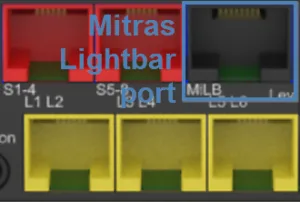
Mitras-LB port (example on the ProfiLux 4)
Connect the feeder cable to the Feeder port on the adapter. Only one feeder configuration is available on Mini/Light — if multiple feeders are connected physically, they all respond to the same settings and cannot be controlled individually.
Looking for full assembly and mounting instructions? Download the GHL Automatic Fish Feeder Manual.
Third-party feeders via 1-10V #
Feeders compatible with a 1-10V control signal can be connected to a 1-10V interface. In the 1-10V interface settings, set the function to Auto. feeder and assign the feeder index you want to use. The feeder is then controlled by the corresponding feeder configuration in software.
Configuration #
Open the feeder settings via Extras → Feeding, then the Automatic feeders tab (GHL Connect) or section (GHL Control Center).
Each feeder entry has the following settings:
- Status: Displays an alarm icon if the GHL Automatic Fish Feeder’s IR light barrier detects that the food container is empty. Only applicable to GHL feeders with this feature.
- Capacity: The total number of food portions the container holds.
- Alarm threshold: Triggers a low-food alert when the calculated fill level drops to this value (in portions). Set to 0 to disable. Particularly useful for feeders without an IR light barrier.
- Fill level: The current calculated fill level in portions, based on feeding events since the last refill.
- Activated by timer (Timer activates in GHL Connect): Select a timer to schedule automatic feedings. The timer must use the Feeding switch mode, which defines the start time and number of food portions per feeding. See the Timer – Configuration Guide.
Manual Feeding and Refill #
Each entry has a Feed button that triggers one feeding cycle immediately, regardless of the timer schedule.
When you refill the container, use the Refill function to update the fill level accordingly. In GHL Connect, each entry has its own Refill button. In GHL Control Center, select the entry first and then click Refill. A dialog opens where you enter the number of portions added.
Numbering (ProfiLux 4 only) #
When multiple GHL Automatic Fish Feeders are connected to the ProfiLux 4, each must be assigned a number (1–4) so they can be controlled independently. Use the Numbering button below the feeder list to start the numbering procedure. The on-screen instructions guide you through assigning a number to each feeder by pressing its manual feed button when prompted.
Notes #
- Feed pause integration: A feed pause can be configured to activate automatically when a feeder triggers a feeding event. This pauses filter channels and other equipment so food is not immediately swept away. See the Feed Pause, Maintenance & Power Cut – Configuration Guide.
- Fill level is software-calculated: The fill level is estimated based on feeding events and manual refill entries — it does not read the actual container contents. The IR light barrier on the GHL Automatic Fish Feeder provides an additional hardware-based low-food detection independent of this calculation.