

Summary #
This guide explains how to assign a function to a ProfiLux 1-10V interface, which determines how the interface controls a connected device. This is a required step before connecting pumps, lighting fixtures, or other 1-10V controllable devices.
Applies to #
- ProfiLux 4 Series (incl. Industrial Line / IL)
- ProfiLux 3 Series
- ProfiLux Mini / Light (all versions)
- Software:
- GHL Connect (App, Webinterface, myGHL)
- GHL Control Center
Before you start #
- Available interfaces: The number of built-in 1-10V interfaces depends on your ProfiLux model. The ProfiLux 4 has 6 (L1–L6, two channels combined per physical port); ProfiLux Mini and ProfiLux Light each have 4. Check your model’s specifications for the exact number.
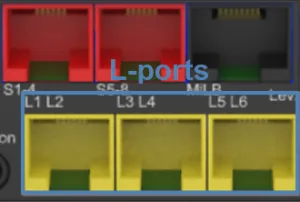
Yellow L-ports on the ProfiLux 4 — port count and layout vary by model and expansion.
- Expansion options: On the ProfiLux 3 and ProfiLux 4, the number of 1-10V interfaces can be increased with a PLM-2L4S or PLM-4L expansion card, or with an Expansion Box 2 (For rack-mounted Industrial Line installations, the Expansion Box IL provides the same functionality).
Configuration #
Step 1 — Open the 1-10V interface settings #
- In GHL Control Center: Go to System → 1-10V interface and select the channel you want to configure.
- In GHL Connect: Select 1-10V interfaces from the main menu and tap the relevant channel.
Step 2 — Assign a function #
Select the Function for the interface. Available options:
- Pump: Controls a variable-speed pump. Requires a pump channel index. See: 1-10V Pump Control – Setup Guide
- Illumination: Controls a dimmable lighting fixture, assigned to an illumination channel as part of a light schedule. Requires an illumination channel index. See: 1-10V Lighting Control – Setup Guide
- Variable illumination: Controls a dimmable lighting fixture, assigned to a variable illumination channel as part of a light schedule. Requires a variable illumination channel index. See: 1-10V Lighting Control – Setup Guide
- Constant Flow: Regulates pump speed based on a connected flow sensor to maintain a constant flow rate. Requires a flow sensor index.
- Auto. feeder: Controls a 1-10V compatible automatic feeder. Requires an auto feeder index.
- Sensor-based functions: A 1-10V interface can also be assigned to a sensor control loop (e.g. Temperature 1, pH-value 1). The control loop then outputs a voltage proportional to the control deviation. For temperature control as an example: if the water temperature exceeds the set temperature, a voltage proportional to the temperature difference is output — the warmer it gets, the higher the voltage. For this specific case, this makes it possible to control an adjustable cooling fan, such as our Propeller Breeze with PropellerControl electronics, and operate it as quietly as possible.
- Always off: Disables the interface. The output remains at 0V.
If your device doesn’t fully power down at 0V, an S-Port & L-Port Breakout Box provides a relay output for complete shutoff.
Note: Assigning a function defines how the interface behaves. Depending on the function, you will need to assign an index (e.g. pump channel, lighting channel, or flow sensor number) to link the interface to the corresponding configuration elsewhere in the system — for example, a pump channel used in Pump Groups.
Step 3 — Set the output voltage range #
Regardless of the selected function, set the U min. and U max. values under Output signal. These define the voltage range the interface uses to control the connected device. As a rule, the range is 1V to 10V, but the optimal values can vary by device:
- U min. (settable range: 0V to 4V): Some devices do not behave linearly at the very bottom of the range. For example, certain dimmable ballasts stop changing light intensity below 1.5V, while others dim down to about 0.8V; some fluorescent tubes shut off entirely after a few minutes if the voltage is set too low. If your device switches off unexpectedly or stops responding at low settings, increase U min. slightly.
- U max. (settable range: 4.5V to 10V): Some devices reach their maximum output before 10V is reached — for example, a pump running at full power already at 8V, or a moonlight that is too bright at 10V. If you notice no further change in output near the top of the range, reduce U max. accordingly.
Tip: For the most accurate control curve, U min. and U max. should match the point where your device’s lowest and highest output levels actually occur — not just the default 1–10V assumption. For lighting, you can test this by manually dimming the channel (via Light Composer or Multichannel Setup): check whether the light intensity still changes at the lowest dimming values (or the lamp shuts off) and whether there is still a visible difference at the highest dimming values. Adjust U min. and U max. and retest as needed.
Step 4 — Program supported GHL devices (optional) #
Some GHL 1-10V devices (e.g. LEDControl4 Active/Passive, LEDControl4 V2, ProfiLux-Simu, ProfiLux-Simu-L, Mitras-Simu-Driver) can be configured directly through the interface using the device’s own programming menu. This only applies to these specific GHL devices — third-party pumps or lighting fixtures connected via 1-10V cannot be programmed this way and are controlled only through the function assigned in Step 2.
- In GHL Connect: On the 1-10V interface settings page, tap Program devices on 1-10V-interfaces (enable Expert mode in the app settings if the button is not visible). Select the connected device and follow the on-screen steps.
- In GHL Control Center: Use the equivalent device programming option on the 1-10V interface page.
Notes #
- Channel numbering order: Channel numbers are assigned in a fixed order: built-in ProfiLux ports first, then expansion cards installed in the ProfiLux, then the built-in ports of an Expansion Box, and finally expansion cards installed in the Expansion Box.