

Summary #
The PropellerBreeze is an aquarium fan for evaporative cooling. Combined with the PropellerControl electronics, the fan speed can be regulated automatically by the ProfiLux based on measured water temperature — the warmer the water, the faster the fan runs. The PropellerBreeze can also be connected directly to its power supply for simple full-speed operation, or switched on and off via a Powerbar socket. This article covers the controlled setup via PropellerControl and the required software configuration.
Applies to #
- PropellerBreeze (all variants)
- PropellerControl
- Compatible controller:
- ProfiLux 4 Series (incl. Industrial Line / IL)
- ProfiLux 3 Series
- ProfiLux Mini / Light (all versions)
- Software:
- GHL Connect (App, Webinterface, myGHL)
- GHL Control Center
Before you start #
- Free 1-10V interface: Make sure a free 1-10V interface is available on your ProfiLux. See the 1-10V Interfaces – Configuration Guide for interface availability and expansion options.
- Optional — YL2 splitter cable: If you want to connect the PropellerControl to a port that is already used by another 1-10V device, a YL2 splitter cable allows both devices to share a single L-port by accessing the odd and even channels independently.
Installation #
Wiring #
- Connect the PropellerBreeze power cable to the red/black output cable of the PropellerControl.
- Connect the PropellerBreeze power supply to the 12VDC input port on the PropellerControl.
- Connect the included control cable (western/RJ11 cable) from the 1-10V ProfiLux port on the PropellerControl to a free yellow L-port on the ProfiLux. Note which port and channel you use (e.g. L1/L2) — you will need this for the software configuration.
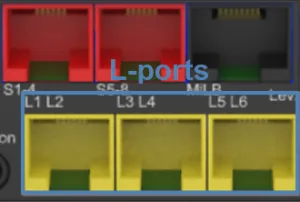
Yellow L-ports on the ProfiLux 4 — port count and layout vary by model and expansion.
Channel Selection (Odd or Even) #
Each yellow L-port on the ProfiLux carries two independent 1-10V channels — an odd channel (L1, L3, L5, …) and an even channel (L2, L4, L6, …). The PropellerControl must be set to react to whichever channel you intend to use in the software.
By default, the PropellerControl is set to react to odd-numbered channels (L1, L3, L5, …). If you connect the control cable directly to the L-port and assign an odd channel in the software, no changes are needed.
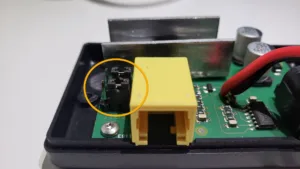
If you need the PropellerControl to react to an even-numbered channel (L2, L4, L6, …) — for example when sharing a port via a YL2 splitter cable and the odd channel is already in use — the jumpers inside the PropellerControl must be moved from pins 1–2 to pins 2–3.
To do this, remove the two screws on the back of the housing with a crosshead screwdriver and lift the cover.
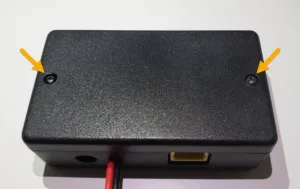
Move both jumpers from pins 1–2 to pins 2–3 as shown below, then close the housing again.
Configuration #
Navigate to 1-10V interfaces in GHL Connect, or System → 1-10V interface in GHL Control Center. Select the channel matching the L-port and channel you connected the PropellerControl to (odd or even, based on the jumper setting).
Set the Function to the temperature sensor whose control output should drive the fan — for example Temperature 1. The 1-10V interface will then output a voltage proportional to the temperature deviation from the setpoint: the further the temperature exceeds the setpoint, the higher the voltage and the faster the fan runs.
Optionally, adjust U min. and U max. to fine-tune the voltage range used. See the 1-10V Interfaces – Configuration Guide for details.
Next Steps #
The temperature sensor assigned to the PropellerControl must be configured with the correct setpoint, hysteresis, and the temperature deviation at which the fan should run at full speed. See the Sensors – Configuration Guide for details.
Notes #
When does the fan switch on, and when does it reach full speed?
The point at which the fan switches on is calculated from the temperature sensor settings:
Switch-on point = Nominal value + (Hysteresis × 0.83) + Cooling difference
Once the switch-on point is reached, the fan starts at minimum speed and increases proportionally as the temperature continues to rise. Full speed is reached once the temperature exceeds the switch-on point by the value configured in “1-10V is max. at deviation of”.
Example with the following sensor settings:
- Nominal value: 26°C
- Hysteresis: 0.5°C
- Cooling difference: 1°C
- 1-10V max. at deviation of: 4°C
Switch-on point: 26°C + (0.5°C × 0.83) + 1°C = 27.4°C — fan starts at minimum speed.
Full speed: 27.4°C + 4°C = 31.4°C — fan runs at 100%.
The nominal value, hysteresis, cooling difference, and “1-10V is max. at deviation of” are all configured in the temperature sensor settings — see the Sensors – Configuration Guide.