Skip to content
+49 6301 32015-0
Facebook page opens in new windowInstagram page opens in new windowYouTube page opens in new window
tiktok
139,90 € 1

View CartCheckout

  • ×Flow-Sensor 5000 L/h Flow-Sensor 5000 L/h 1 × 139,90 €
    Includes 19% VAT

Subtotal: 139,90 €

View CartCheckout

Wishlist
Login
My Account
  • English
  • Deutsch (German)
GHL Advanced Technology
High-Tech for Aquariums, Aquaculture and Science, Made in Germany since 1998
GHL Advanced TechnologyGHL Advanced Technology
  • Store
    • Measuring/Controlling
    • Dosing
    • Lighting
    • Pumps
    • Industrial Line
    • Cooling
    • Sensors and Accessories
    • GHL fan articles
    • Gift Coupons
    • On sale
  • Products
    • ProfiLux Aquarium Controller
      • ProfiLux Light WiFi
      • ProfiLux Mini WiFi
      • ProfiLux 4e
      • ProfiLux 4
      • ProfiLux Controller Sets
    • ProfiLux Accessories
      • GHL Control Pad
      • Automatic Fish Feeder
      • ProfiLux Expansion Cards
      • ProfiLux Expansion Box 2
      • Powerbars
      • GHL Sensors
      • Breakout Boxes & Adapters
      • Miscellaneous ProfiLux Accessories
    • GHL Illumination
      • Mitras LX7 Series
      • Mitras LX7 IL Series
      • Mitras LX Accessories
      • Mitras Lightbar 3
      • Mitras Lightbar 2
      • Mitras Slimline
      • Mitras-Simu-Stick
      • LED-Controller
      • Illumination Accessories
    • GHL Doser
      • GHL Doser 3
      • GHL Doser 2.2
      • GHL Doser 3 Maxi
      • GHL Doser 2.2 Maxi
      • Doser Accessories
      • Dosing Containers
      • Magnetic Stirrer
    • KH Director®
      • KH Director® Accessories
    • ION Director®
      • ION Director® Accessories
    • Pumps
      • Versia® Flow
      • Versia® Stream
      • Pump accessories
      • Versia®-Controller
    • Industrial Line
    • GHL Cooling Technology
      • Aquarium Fans
  • Software
    • GHL Connect
    • GHL Control Center
  • Aquaculture Technology
  • Support
  • News
    • Blog
    • Promotions & Sales
    • Product News
    • Highlights
    • Lighting Essentials
    • Events
    • Tank Of The Month (TOTM)
  • References
    • Application examples
  • myGHL
Search:
  • Store
    • Measuring/Controlling
    • Dosing
    • Lighting
    • Pumps
    • Industrial Line
    • Cooling
    • Sensors and Accessories
    • GHL fan articles
    • Gift Coupons
    • On sale
  • Products
    • ProfiLux Aquarium Controller
      • ProfiLux Light WiFi
      • ProfiLux Mini WiFi
      • ProfiLux 4e
      • ProfiLux 4
      • ProfiLux Controller Sets
    • ProfiLux Accessories
      • GHL Control Pad
      • Automatic Fish Feeder
      • ProfiLux Expansion Cards
      • ProfiLux Expansion Box 2
      • Powerbars
      • GHL Sensors
      • Breakout Boxes & Adapters
      • Miscellaneous ProfiLux Accessories
    • GHL Illumination
      • Mitras LX7 Series
      • Mitras LX7 IL Series
      • Mitras LX Accessories
      • Mitras Lightbar 3
      • Mitras Lightbar 2
      • Mitras Slimline
      • Mitras-Simu-Stick
      • LED-Controller
      • Illumination Accessories
    • GHL Doser
      • GHL Doser 3
      • GHL Doser 2.2
      • GHL Doser 3 Maxi
      • GHL Doser 2.2 Maxi
      • Doser Accessories
      • Dosing Containers
      • Magnetic Stirrer
    • KH Director®
      • KH Director® Accessories
    • ION Director®
      • ION Director® Accessories
    • Pumps
      • Versia® Flow
      • Versia® Stream
      • Pump accessories
      • Versia®-Controller
    • Industrial Line
    • GHL Cooling Technology
      • Aquarium Fans
  • Software
    • GHL Connect
    • GHL Control Center
  • Aquaculture Technology
  • Support
  • News
    • Blog
    • Promotions & Sales
    • Product News
    • Highlights
    • Lighting Essentials
    • Events
    • Tank Of The Month (TOTM)
  • References
    • Application examples
  • myGHL
“Flow-Sensor 5000 L/h” has been added to your cart. View cart
Grid view List view

Showing all 4 results

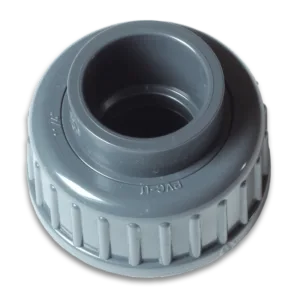
PVC-fittings for Flow-Sensors
Select options This product has multiple variants. The options may be chosen on the product page

PVC-fittings for Flow-Sensors

11,90 € – 24,90 €Price range: 11,90 € through 24,90 €
Includes 19% VAT
plus shipping

Metric and imperial versions matching for Flow-Sensors

Wishlist
Flow-Sensor 2000 L/h
Add to cart

Flow-Sensor 2000 L/h

119,90 €
Includes 19% VAT
plus shipping

Flow sensor, 100 – 2000 L/h Nominal width DN10, 2x G1/2″ outside thread, without connection adapter inkl. 2m Kabel Mini-DIN<->M12

Wishlist
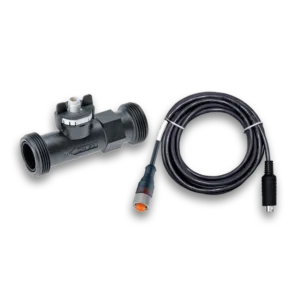
Flow-Sensor 5000 L/h
Add to cart

Flow-Sensor 5000 L/h

139,90 €
Includes 19% VAT
plus shipping

Flow sensor, 300 – 5000 L/h Nominal width DN20, 2x G1″ outside thread, without connection adapter inkl. 2m Kabel Mini-DIN<->M12

Wishlist
Flow-Sensor 9000 L/h
Add to cart

Flow-Sensor 9000 L/h

159,90 €
Includes 19% VAT
plus shipping

Flow sensor, 540 – 9000 L/h Nominal width DN25, 2x G1 1/4″ outside thread, without connection adapter inkl. 2m Kabel Mini-DIN<->M12

Wishlist
Product categories
  • Measuring/Controlling
    • ProfiLux Aquarium Controller
    • Sensors and Accessories
      • pH/Redox/Salinity/MUI/Oxygen
      • Watertemp/Airtemp/Humidity
      • Level-Sensors
      • Flow Sensors
      • Leakage
      • Sensor Accessories
    • Expansion Cards
    • Calibration Fluids + Reference solutions
    • Expansion Box 2
    • Cables
    • ION Director
  • Dosing
  • Lighting
  • Pumps
  • Industrial Line
  • Powerbars
  • KH Director
  • Cooling
  • Power supplies
  • GHL fan articles
  • Replacement parts
  • Gift Coupons
  • On sale
Sort by
Price
€ -
Knowledge Base
  • Socket outlet functions
    • How to setup STDL4-4 Powerbar on ProfiLux
    • Which pumps can be controlled by ProfiLux?
    • How to setup return pump control
    • How to setup heater control
    • How to setup a SHORT Timer function (seconds)
    • How to setup Calcium Reactor control
    • How to setup GHL Magnetic Stirrers
    • Programmable Logic Examples
    • How to stop dosing when pH is above (x)
    • How to setup a Feed Pause delay
    • How to set fallback states on a Powerbar
    • How to setup a Maintenance mode delay
    • How to setup Gen 1 Doser on ProfiLux
    • How to setup skimmer control
  • Installation
    • How to setup STDL4-4 Powerbar on ProfiLux
    • ION Director Initial Setup (Part 2)
    • Save and load light composer projects
    • How to connect GHL Doser 2.1 SA to your network (Wi-Fi)
    • ION Director Initial Setup (Part 3)
    • KH Director Initial Setup (Part 1)
    • How to switch SA Doser to EXT mode
    • KH Director Initial Setup (Part 2)
    • How to setup GHL Flow Sensors
    • KH Director Initial Setup (Part 3)
    • How to Setup a GHL Automatic Fish Feeder
    • How to setup control via dosing pumps (Add-on/Adaptive mode)
    • How to Setup a 1-10V Fish Feeder
    • How to assign PAB-devices
    • How to connect GHL Doser 2.1 SA to your network (LAN)
    • How to Setup a Mitras Lightbar 3
    • Level Control and Leakage Monitoring
    • ION Director Initial Setup (Part 1)
    • How to operate GHL Devices
    • Assign functions to 1-10 V interfaces
    • How to access GHL Devices with GHL Connect App
    • About the ProfiLux Aquatic Bus (PAB)
  • ProfiLux
    • ProfiLux Light
      • How to setup non-dimmable light control
      • How to setup STDL4-4 Powerbar on ProfiLux
      • How to use the GHL Logbook
      • How to setup 1-10V lighting control
      • How to change ProfiLux / Mitras LX display language
      • How to setup Push Notifications
      • How to add your device to myGHL cloud
      • How to: ProfiLux Wi-Fi setup (Auto IP)
      • Initial Setup: GHL Devices (ProfiLux, Doser, Mitras LX7)
      • How to backup and restore GHL device settings / probe data
      • How to connect via USB
      • How to Setup a GHL Automatic Fish Feeder
      • How to operate GHL Devices
      • How to setup heater control
      • How to update or restore Wi-Fi module firmware
      • How to Setup a 1-10V Fish Feeder
      • How to setup Maintenance modes with ProfiLux
      • How to setup 1-10V pump control
      • How to: ProfiLux Wi-Fi setup (Static IP)
      • How to setup Feed Pauses with ProfiLux
      • Troubleshooting: ProfiLux 4 / 4e / Mini / Light
      • How to restore factory settings
      • How to setup a standard Timer (ON/OFF) function
      • How to: ProfiLux Mini / Light Emergency Update
      • How to update ProfiLux firmware
      • How the ProfiLux Aquarium Controller works
      • How to create custom wave patterns with ProfiLux
      • Assign functions to 1-10 V interfaces
    • ProfiLux Mini
      • How to setup non-dimmable light control
      • How to calibrate the Conductivity probe
      • How to connect via USB
      • Initial Setup: GHL Devices (ProfiLux, Doser, Mitras LX7)
      • How to setup 1-10V lighting control
      • How to setup 1-10V pump control
      • How to sync myGHL account to GHL Connect app
      • How to Setup a GHL Automatic Fish Feeder
      • How to add your device to myGHL cloud
      • Troubleshooting: ProfiLux 4 / 4e / Mini / Light
      • How to update or restore Wi-Fi module firmware
      • How to Setup a 1-10V Fish Feeder
      • How to backup and restore GHL device settings / probe data
      • How to: ProfiLux Mini / Light Emergency Update
      • How to: ProfiLux Wi-Fi setup (Static IP)
      • How to operate GHL Devices
      • How to setup heater control
      • How to setup skimmer control
      • How to restore factory settings
      • How to setup Maintenance modes with ProfiLux
      • How to setup Calcium Reactor control
      • How to setup STDL4-4 Powerbar on ProfiLux
      • How to update ProfiLux firmware
      • How to setup Feed Pauses with ProfiLux
      • How to calibrate the pH probe
      • How to change ProfiLux / Mitras LX display language
      • How to use the GHL Logbook
      • How to setup a standard Timer (ON/OFF) function
      • How to calibrate the Redox probe
      • How to: ProfiLux Wi-Fi setup (Auto IP)
      • How to setup Push Notifications
      • How the ProfiLux Aquarium Controller works
      • How to create custom wave patterns with ProfiLux
      • Assign functions to 1-10 V interfaces
    • ProfiLux 4e
      • How to setup Maintenance modes with ProfiLux
      • How to backup and restore GHL device settings / probe data
      • How to convert a Redox port into a pH port / vise versa
      • How to calibrate ProfiLux / Mitras touch keys
      • How to setup STDL4-4 Powerbar on ProfiLux
      • KH Director Initial Setup (Part 2)
      • ION Director Initial Setup (Part 2)
      • How to setup Gen 1 Doser on ProfiLux
      • How to Setup a 1-10V Fish Feeder
      • How to setup Feed Pauses with ProfiLux
      • How to setup heater control
      • How to add a Virtual probe
      • How to setup a dosing pump schedule
      • How to setup return pump control
      • KH Director Initial Setup (Part 3)
      • ION Director Initial Setup (Part 3)
      • How to convert Conductivity probe to FW or SW mode
      • How to setup a standard Timer (ON/OFF) function
      • GHL Vortech controller and Mobius compatibility
      • Level Control and Leakage Monitoring
      • How to control Mitras LX7 via ProfiLux
      • How to change ProfiLux / Mitras LX display language
      • About: GHL logo LED color codes
      • How to switch SA Doser to EXT mode
      • How to update PAB Devices
      • How to operate GHL Devices
      • How to setup non-dimmable light control
      • How to setup Calcium Reactor control
      • How to setup email and text notifications
      • ProfiLux Expansion Card installation (How-to)
      • How to: ProfiLux Wi-Fi setup (Auto IP)
      • How to setup control via dosing pumps (Add-on/Adaptive mode)
      • How to set fallback states on a Powerbar
      • How to use the GHL Logbook
      • How to setup 1-10V lighting control
      • How to calibrate the pH probe
      • How to record probe values
      • Programmable Logic Examples
      • How to connect via USB
      • How to setup GHL Magnetic Stirrers
      • How to update ProfiLux firmware
      • How to setup Push Notifications
      • How to setup ATO control with ProfiLux
      • How to add your device to myGHL cloud
      • How to calibrate the Redox probe
      • How to setup 1-10V pump control
      • How to setup a Feed Pause delay
      • How to update or restore Wi-Fi module firmware
      • How to stop dosing when pH is above (x)
      • Conductivity-Salinity calculators vs. ProfiLux calculated values
      • Initial Setup: GHL Devices (ProfiLux, Doser, Mitras LX7)
      • How to setup AWC control with ProfiLux
      • How to assign PAB-devices
      • How to calibrate the Conductivity probe
      • Troubleshooting: ProfiLux 4 / 4e / Mini / Light
      • How to setup a Maintenance mode delay
      • How to: ProfiLux Wi-Fi setup (Static IP)
      • How to restore factory settings
      • How to setup GHL Flow Sensors
      • Intro to ProfiLux Pump Groups
      • How to setup Leakage Detection with ProfiLux
      • How to setup Vortech pump control
      • How to setup power loss monitoring / emergency backup program
      • How to: ProfiLux 4 / 4e Emergency Update
      • How to setup skimmer control
      • KH Director Initial Setup (Part 1)
      • ION Director Initial Setup (Part 1)
      • How to setup a CYCLIC Timer function
      • How to Setup a GHL Automatic Fish Feeder
      • How the ProfiLux Aquarium Controller works
      • How to create custom wave patterns with ProfiLux
      • KH Director: Change of Adaptive and Add-On Control from P4 Firmware 7.24 / Doser SA 1.37
    • ProfiLux 3
      • How to setup Leakage Detection with ProfiLux
      • How to setup Vortech pump control
      • How to setup power loss monitoring / emergency backup program
      • ProfiLux Expansion Card installation (How-to)
      • How to connect via USB
      • ION Director Initial Setup (Part 1)
      • How to setup a CYCLIC Timer function
      • How to setup Maintenance modes with ProfiLux
      • How to backup and restore GHL device settings / probe data
      • How to add a Virtual probe
      • Programmable Logic Examples
      • KH Director Initial Setup (Part 1)
      • ION Director Initial Setup (Part 2)
      • How to setup Gen 1 Doser on ProfiLux
      • How to setup Feed Pauses with ProfiLux
      • How to setup heater control
      • Level Control and Leakage Monitoring
      • How to setup a Feed Pause delay
      • KH Director Initial Setup (Part 2)
      • ION Director Initial Setup (Part 3)
      • How to convert Conductivity probe to FW or SW mode
      • How to setup a standard Timer (ON/OFF) function
      • GHL Vortech controller and Mobius compatibility
      • How to setup email and text notifications
      • How to setup a Maintenance mode delay
      • KH Director Initial Setup (Part 3)
      • How to switch SA Doser to EXT mode
      • How to update PAB Devices
      • How to setup non-dimmable light control
      • How to setup Calcium Reactor control
      • How to record probe values
      • How to setup skimmer control
      • How to setup control via dosing pumps (Add-on/Adaptive mode)
      • How to set fallback states on a Powerbar
      • How to use the GHL Logbook
      • How to operate GHL Devices
      • How to setup 1-10V lighting control
      • How to calibrate the pH probe
      • How to setup 1-10V pump control
      • How to setup STDL4-4 Powerbar on ProfiLux
      • How to setup GHL Magnetic Stirrers
      • How to update ProfiLux firmware
      • Intro to ProfiLux Pump Groups
      • How to setup ATO control with ProfiLux
      • How to add your device to myGHL cloud
      • How to calibrate the Redox probe
      • How to setup a dosing pump schedule
      • How to setup return pump control
      • How to stop dosing when pH is above (x)
      • Conductivity-Salinity calculators vs. ProfiLux calculated values
      • How to setup AWC control with ProfiLux
      • How to assign PAB-devices
      • How to calibrate the Conductivity probe
      • How to control Mitras LX7 via ProfiLux
      • How to change ProfiLux / Mitras LX display language
      • How to restore factory settings
      • How to setup GHL Flow Sensors
      • How the ProfiLux Aquarium Controller works
      • How to create custom wave patterns with ProfiLux
      • Which pumps can be controlled by ProfiLux?
      • Assign functions to 1-10 V interfaces
    • ProfiLux 4
      • How to setup AWC control with ProfiLux
      • How to assign PAB-devices
      • How to calibrate the Conductivity probe
      • Troubleshooting: ProfiLux 4 / 4e / Mini / Light
      • How to setup a Maintenance mode delay
      • How to: ProfiLux Wi-Fi setup (Static IP)
      • How to restore factory settings
      • How to setup GHL Flow Sensors
      • Intro to ProfiLux Pump Groups
      • How to setup Leakage Detection with ProfiLux
      • How to setup Vortech pump control
      • How to setup power loss monitoring / emergency backup program
      • How to: ProfiLux 4 / 4e Emergency Update
      • How to setup skimmer control
      • KH Director Initial Setup (Part 1)
      • ION Director Initial Setup (Part 1)
      • How to setup a CYCLIC Timer function
      • How to Setup a GHL Automatic Fish Feeder
      • How to setup Maintenance modes with ProfiLux
      • How to backup and restore GHL device settings / probe data
      • How to convert a Redox port into a pH port / vise versa
      • How to calibrate ProfiLux / Mitras touch keys
      • How to setup STDL4-4 Powerbar on ProfiLux
      • KH Director Initial Setup (Part 2)
      • ION Director Initial Setup (Part 2)
      • How to setup Gen 1 Doser on ProfiLux
      • How to Setup a 1-10V Fish Feeder
      • How to setup Feed Pauses with ProfiLux
      • How to setup heater control
      • How to add a Virtual probe
      • How to setup a dosing pump schedule
      • How to setup return pump control
      • KH Director Initial Setup (Part 3)
      • ION Director Initial Setup (Part 3)
      • How to convert Conductivity probe to FW or SW mode
      • How to setup a standard Timer (ON/OFF) function
      • GHL Vortech controller and Mobius compatibility
      • Level Control and Leakage Monitoring
      • How to control Mitras LX7 via ProfiLux
      • How to change ProfiLux / Mitras LX display language
      • About: GHL logo LED color codes
      • How to switch SA Doser to EXT mode
      • How to update PAB Devices
      • How to operate GHL Devices
      • How to setup non-dimmable light control
      • How to setup Calcium Reactor control
      • How to setup email and text notifications
      • ProfiLux Expansion Card installation (How-to)
      • How to: ProfiLux Wi-Fi setup (Auto IP)
      • How to setup control via dosing pumps (Add-on/Adaptive mode)
      • How to set fallback states on a Powerbar
      • How to use the GHL Logbook
      • How to setup 1-10V lighting control
      • How to calibrate the pH probe
      • How to record probe values
      • Programmable Logic Examples
      • How to connect via USB
      • How to setup GHL Magnetic Stirrers
      • How to update ProfiLux firmware
      • How to setup Push Notifications
      • How to setup ATO control with ProfiLux
      • How to add your device to myGHL cloud
      • How to calibrate the Redox probe
      • How to setup 1-10V pump control
      • How to setup a Feed Pause delay
      • How to update or restore Wi-Fi module firmware
      • How to stop dosing when pH is above (x)
      • Conductivity-Salinity calculators vs. ProfiLux calculated values
      • Initial Setup: GHL Devices (ProfiLux, Doser, Mitras LX7)
      • How the ProfiLux Aquarium Controller works
      • How to create custom wave patterns with ProfiLux
      • Which pumps can be controlled by ProfiLux?
      • Assign functions to 1-10 V interfaces
      • KH Director: Change of Adaptive and Add-On Control from P4 Firmware 7.24 / Doser SA 1.37
    • How to setup heater control
    • How to setup STDL4-4 Powerbar on ProfiLux
    • How the ProfiLux Aquarium Controller works
    • GHL Vortech controller and Mobius compatibility
    • How to change ProfiLux / Mitras LX display language
    • How to setup Calcium Reactor control
    • How to connect via USB
    • How to calibrate the pH probe
    • How to sync myGHL account to GHL Connect app
    • How to customize the GHL Dashboard
    • How to calibrate the Redox probe
    • How to: Control Propeller Breeze fan via ProfiLux
    • How to setup 1-10V lighting control
    • How to calibrate the Conductivity probe
    • How to setup a SHORT Timer function (seconds)
    • How to add your device to myGHL cloud
    • How to setup 1-10V pump control
    • How to use the GHL Logbook
    • How to backup and restore GHL device settings / probe data
    • GCC: Change language from German to English
    • How to Setup a Mitras Lightbar 3
    • Assign functions to 1-10 V interfaces
    • How to: Emergency updates for PAB-devices
  • GHL Doser
    • GHL Doser 2.2
      • How to switch SA Doser to EXT mode
      • About: GHL logo LED color codes
      • How to update Standalone Doser firmware
      • How to setup control via dosing pumps (Add-on/Adaptive mode)
      • How to: GHL Doser Emergency Update
      • How to setup GHL Magnetic Stirrers
      • How to setup ATO control on SA Doser
      • How to restore factory settings
      • How to update PAB Devices
      • ION Director Initial Setup (Part 1)
      • How to use the GHL Logbook
      • ION Director Initial Setup (Part 2)
      • How to Setup Continuous Mode for GHL Doser
      • ION Director Initial Setup (Part 3)
    • GHL Doser 2.1
      • How to connect via USB
      • How to setup control via dosing pumps (Add-on/Adaptive mode)
      • How to update Standalone Doser firmware
      • How to operate GHL Devices
      • How to connect GHL Doser 2.1 SA to your network (Wi-Fi)
      • How to setup GHL Magnetic Stirrers
      • How to: GHL Doser Emergency Update
      • How to add your device to myGHL cloud
      • How to sync myGHL account to GHL Connect app
      • How to connect GHL Doser 2.1 SA to your network (LAN)
      • How to setup ATO control on SA Doser
      • How to assign PAB-devices
      • KH Director Initial Setup (Part 1)
      • How to restore factory settings
      • How to update PAB Devices
      • How to backup and restore GHL device settings / probe data
      • KH Director Initial Setup (Part 2)
      • ION Director Initial Setup (Part 1)
      • How to use the GHL Logbook
      • How to record probe values
      • KH Director Initial Setup (Part 3)
      • ION Director Initial Setup (Part 2)
      • How to Setup Continuous Mode for GHL Doser
      • How to setup a dosing pump schedule
      • About: GHL logo LED color codes
      • ION Director Initial Setup (Part 3)
      • Doser 2.1 / 2.2: Maintenance and care
      • Troubleshooting: GHL Doser Standalone
      • How to switch SA Doser to EXT mode
    • GHL Doser 2
      • How to connect GHL Doser 2.1 SA to your network (Wi-Fi)
      • How to setup GHL Magnetic Stirrers
      • How to: GHL Doser Emergency Update
      • How to operate GHL Devices
      • How to sync myGHL account to GHL Connect app
      • How to connect GHL Doser 2.1 SA to your network (LAN)
      • How to setup ATO control on SA Doser
      • How to add your device to myGHL cloud
      • KH Director Initial Setup (Part 1)
      • How to restore factory settings
      • How to update PAB Devices
      • How to assign PAB-devices
      • KH Director Initial Setup (Part 2)
      • ION Director Initial Setup (Part 1)
      • How to use the GHL Logbook
      • How to backup and restore GHL device settings / probe data
      • KH Director Initial Setup (Part 3)
      • ION Director Initial Setup (Part 2)
      • How to record probe values
      • About: GHL logo LED color codes
      • ION Director Initial Setup (Part 3)
      • How to setup a dosing pump schedule
      • Troubleshooting: GHL Doser Standalone
      • How to switch SA Doser to EXT mode
      • How to connect via USB
      • How to setup control via dosing pumps (Add-on/Adaptive mode)
      • How to update Standalone Doser firmware
    • Dosing Unit
      • How to setup Gen 1 Doser on ProfiLux
    • GHL Doser 2.2 Maxi
      • How to sync myGHL account to GHL Connect app
      • How to restore factory settings
      • How to update PAB Devices
      • How to operate GHL Devices
      • KH Director Initial Setup (Part 1)
      • ION Director Initial Setup (Part 1)
      • How to use the GHL Logbook
      • How to add your device to myGHL cloud
      • KH Director Initial Setup (Part 2)
      • ION Director Initial Setup (Part 2)
      • Initial Setup: GHL Devices (ProfiLux, Doser, Mitras LX7)
      • How to assign PAB-devices
      • KH Director Initial Setup (Part 3)
      • ION Director Initial Setup (Part 3)
      • How to Setup Continuous Mode for GHL Doser
      • How to backup and restore GHL device settings / probe data
      • About: GHL logo LED color codes
      • How to switch SA Doser to EXT mode
      • Doser 2.2 Maxi: Maintenance and Care
      • How to record probe values
      • Troubleshooting: GHL Doser Standalone
      • How to update Standalone Doser firmware
      • How to setup a dosing pump schedule
      • How to setup control via dosing pumps (Add-on/Adaptive mode)
      • How to: GHL Doser Emergency Update
      • How to connect via USB
      • How to setup GHL Magnetic Stirrers
      • How to setup ATO control on SA Doser
    • How to setup control via dosing pumps (Add-on/Adaptive mode)
    • How to: Emergency updates for PAB-devices
    • How to connect GHL Doser 2.1 SA to your network (LAN)
    • How to customize the GHL Dashboard
    • ION Director Initial Setup (Part 1)
    • How to add your device to myGHL cloud
    • ION Director Initial Setup (Part 2)
    • How to backup and restore GHL device settings / probe data
    • How to switch SA Doser to EXT mode
    • How to setup a dosing pump schedule
    • How to update Standalone Doser firmware
    • GCC: Change language from German to English
    • How to connect GHL Doser 2.1 SA to your network (Wi-Fi)
  • Software
    • GHL Connect
      • The GHL Community translates
        • Introduction
        • Live translation
        • Translating in the translation editor
        • Role Proofreader
        • FAQ
      • How to customize the GHL Dashboard
      • How to setup heater control
      • How to setup a dosing pump schedule
      • How to change ProfiLux / Mitras LX display language
      • How to setup a SHORT Timer function (seconds)
      • ION Director Initial Setup (Part 1)
      • How to setup Push Notifications
      • How to access GHL Devices with GHL Connect App
      • How to setup a standard Timer (ON/OFF) function
      • How to setup Calcium Reactor control
      • How to control Mitras LX7 via ProfiLux
      • How to: ProfiLux Wi-Fi setup (Auto IP)
      • KH Director Initial Setup (Part 2)
      • ION Director Initial Setup (Part 2)
      • Initial Setup: GHL Devices (ProfiLux, Doser, Mitras LX7)
      • Webcam
      • How to setup non-dimmable light control
      • How to setup power loss monitoring / emergency backup program
      • Programmable Logic Examples
      • How to connect GHL Doser 2.1 SA to your network (Wi-Fi)
      • KH Director Initial Setup (Part 3)
      • ION Director Initial Setup (Part 3)
      • Intro to ProfiLux Pump Groups
      • How to setup ATO control with ProfiLux
      • How to setup 1-10V lighting control
      • How to setup email and text notifications
      • How to setup a Feed Pause delay
      • How to sync myGHL account to GHL Connect app
      • Troubleshooting: GHL Doser Standalone
      • How to set fallback states on a Powerbar
      • myGHL is moving
      • How to setup AWC control with ProfiLux
      • How to add your device to myGHL cloud
      • How to record probe values
      • How to setup a Maintenance mode delay
      • How to: ProfiLux Wi-Fi setup (Static IP)
      • How to setup control via dosing pumps (Add-on/Adaptive mode)
      • How to setup GHL Flow Sensors
      • How to delete your myGHL account
      • How to setup Leakage Detection with ProfiLux
      • How to assign PAB-devices
      • How to setup 1-10V pump control
      • How to setup skimmer control
      • How to: Mitras LX7 Wi-Fi setup (Auto IP)
      • How to setup GHL Magnetic Stirrers
      • How to setup a CYCLIC Timer function
      • How to Setup a GHL Automatic Fish Feeder
      • How to setup Maintenance modes with ProfiLux
      • How to setup Vortech pump control
      • Troubleshooting: ProfiLux 4 / 4e / Mini / Light
      • How to setup STDL4-4 Powerbar on ProfiLux
      • How to: Mitras LX7 Wi-Fi setup (Static IP)
      • How to stop dosing when pH is above (x)
      • How to setup Gen 1 Doser on ProfiLux
      • How to Setup a 1-10V Fish Feeder
      • How to setup Feed Pauses with ProfiLux
      • How to backup and restore GHL device settings / probe data
      • How to calibrate ProfiLux / Mitras touch keys
      • How to setup return pump control
      • How to: Control Propeller Breeze fan via ProfiLux
      • How to connect GHL Doser 2.1 SA to your network (LAN)
      • How to use the GHL Logbook
      • How to Setup a Mitras Lightbar 3
    • GHL Control Center
      • How to: ProfiLux Wi-Fi setup (Auto IP)
      • How to connect GHL Doser 2.1 SA to your network (LAN)
      • Intro to ProfiLux Pump Groups
      • How to: Emergency updates for PAB-devices
      • How to connect via USB
      • How to restore factory settings
      • How to Setup a Mitras Lightbar 3
      • How to connect GHL Doser 2.1 SA to your network (Wi-Fi)
      • How to update ProfiLux firmware
      • Troubleshooting: ProfiLux 4 / 4e / Mini / Light
      • How to: ProfiLux Wi-Fi setup (Static IP)
      • How to update Mitras LX firmware
      • How to calibrate ProfiLux / Mitras touch keys
      • How to: Mitras LX7 Wi-Fi setup (Auto IP)
      • How to setup GHL Flow Sensors
      • How to control Mitras LX7 via ProfiLux
      • How to: Mitras LX7 Wi-Fi setup (Static IP)
      • How to update Standalone Doser firmware
      • GCC: Change language from German to English
      • Troubleshooting: GHL Doser Standalone
      • How to setup Gen 1 Doser on ProfiLux
      • How to change ProfiLux / Mitras LX display language
      • How to setup GHL Magnetic Stirrers
      • How to update PAB Devices
      • KH Director: Change of Adaptive and Add-On Control from P4 Firmware 7.24 / Doser SA 1.37
    • How to calibrate ProfiLux / Mitras touch keys
  • GHL LED & T5 Illumination
    • Mitras LX6
      • How to update Mitras LX firmware
      • Save and load light composer projects
      • How to calibrate ProfiLux / Mitras touch keys
      • How to control Mitras LX7 via ProfiLux
      • How to change ProfiLux / Mitras LX display language
      • How to connect via USB
      • How to restore factory settings
      • How to operate GHL Devices
    • Mitras LX7
      • How to change ProfiLux / Mitras LX display language
      • How to use the GHL Logbook
      • Save and load light composer projects
      • How to connect via USB
      • Initial Setup: GHL Devices (ProfiLux, Doser, Mitras LX7)
      • How to sync myGHL account to GHL Connect app
      • How to: Mitras LX7 Emergency Update
      • How to customize the GHL Dashboard
      • How to update or restore Wi-Fi module firmware
      • How to add your device to myGHL cloud
      • How to: Mitras LX7 Wi-Fi setup (Auto IP)
      • How to backup and restore GHL device settings / probe data
      • How to: Mitras LX7 Wi-Fi setup (Static IP)
      • How to calibrate ProfiLux / Mitras touch keys
      • How to restore factory settings
      • How to control Mitras LX7 via ProfiLux
      • How to update Mitras LX firmware
      • How to operate GHL Devices
    • Mitras Lightbar 2
      • How to Setup a Mitras Lightbar 3
    • Save and load light composer projects
    • GCC: Change language from German to English
  • KH Director
    • How to sync myGHL account to GHL Connect app
    • Achieving Alkalinity Stability with the KH Director
    • KH Director Initial Setup (Part 1)
    • KH Director Initial Setup (Part 2)
    • KH Director Initial Setup (Part 3)
    • How to assign PAB-devices
    • How to setup control via dosing pumps (Add-on/Adaptive mode)
    • KH Director tips and troubleshooting
    • FAQ: KH Director
    • How to record probe values
    • How to calculate the KHD parameters for EZ DSR control
    • How to: Emergency updates for PAB-devices
    • KH Director: Change of Adaptive and Add-On Control from P4 Firmware 7.24 / Doser SA 1.37
  • DSR
    • How to calculate the KHD parameters for EZ DSR control
  • Illumination control
    • Save and load light composer projects
    • How to setup 1-10V lighting control
  • ION Director
    • How to setup control via dosing pumps (Add-on/Adaptive mode)
    • ION Director Initial Setup (Part 1)
    • ION Director Initial Setup (Part 2)
    • ION Director Initial Setup (Part 3)
    • ION Director Tips, Maintenance and Troubleshooting
    • ION Director Sensor Troubleshooting
  • Sensors
    • How to add a Virtual probe
    • How to setup ATO control with ProfiLux
    • How to record probe values
    • How to setup AWC control with ProfiLux
    • Conductivity-Salinity calculators vs. ProfiLux calculated values
    • How to setup Leakage Detection with ProfiLux
    • How to setup GHL Flow Sensors
    • How to calibrate the pH probe
    • How to convert Conductivity probe to FW or SW mode
    • How to calibrate the Redox probe
    • How to calibrate the Conductivity probe
    • How to convert a Redox port into a pH port / vise versa
  • Versia
    • Versia Flow
      • Versia: General Information
      • Versia Flow Manual & Setup Guide
    • Versia Controller
      • Versia Controller Manual & Setup Guide
      • Versia: General Information
    • Versia Stream
      • Versia Stream Manual & Setup Guide
      • Versia: General Information
    • Versia: General Information
  • Sensorfunctions
    • How to convert a Redox port into a pH port / vise versa
    • How to setup ATO control with ProfiLux
    • How to add a Virtual probe
    • How to setup AWC control with ProfiLux
    • Level Control and Leakage Monitoring
    • How to setup Leakage Detection with ProfiLux
    • How to stop dosing when pH is above (x)
    • How to setup heater control
    • How to setup GHL Flow Sensors
    • How to calibrate the pH probe
    • How to setup a CYCLIC Timer function
    • How to calibrate the Redox probe
    • How to convert Conductivity probe to FW or SW mode
    • How to calibrate the Conductivity probe

You can subscribe to the GHL USA newsletter here.

Main pages
  • Home
  • Products
  • Software
  • Support
  • News
Store
  • Terms and Conditions
  • Payment Methods
  • Right of Withdrawal / Model Withdrawal Form
© 2026 GHL Advanced Technology GmbH & Co. KG
  • Contact
  • Impressum
  • Data Protection Regulation
  • Become a Brand Ambassador!
AboutUs
Go to Top
Manage Cookie Consent
To provide the best experiences, we use technologies like cookies to store and/or access device information. Consenting to these technologies will allow us to process data such as browsing behavior or unique IDs on this site. Not consenting or withdrawing consent, may adversely affect certain features and functions.
Functional Always active
The technical storage or access is strictly necessary for the legitimate purpose of enabling the use of a specific service explicitly requested by the subscriber or user, or for the sole purpose of carrying out the transmission of a communication over an electronic communications network.
Preferences
The technical storage or access is necessary for the legitimate purpose of storing preferences that are not requested by the subscriber or user.
Statistics
The technical storage or access that is used exclusively for statistical purposes. The technical storage or access that is used exclusively for anonymous statistical purposes. Without a subpoena, voluntary compliance on the part of your Internet Service Provider, or additional records from a third party, information stored or retrieved for this purpose alone cannot usually be used to identify you.
Marketing
The technical storage or access is required to create user profiles to send advertising, or to track the user on a website or across several websites for similar marketing purposes.
  • Manage options
  • Manage services
  • Manage {vendor_count} vendors
  • Read more about these purposes
View preferences
  • {title}
  • {title}
  • {title}